Website Security in 2026: How to Scan for Vulnerabilities and Protect Your Site
How to tell if your site is hacked or infected, the top ways WordPress gets breached, and how to scan for vulnerabilities and malware in a minute. Step-by-step protection checklist + a free scanner.
Dozens of websites are hacked every minute. Most owners find out last — when the site is already flagged as "dangerous" in Google, emails land in spam, and pages fill up with someone else's links to casinos and pharmacies. By various estimates, up to 40% of all websites run on WordPress, and they are target number one for automated attacks. This guide explains how sites get hacked, how to tell if you're already infected, and how to scan and protect your site in minutes.
Why websites get hacked — and why WordPress is target #1
A website hack is almost always automated. Bots scan the internet around the clock for known weaknesses: an old plugin with a hole, a forgotten .env file with passwords, an enabled xmlrpc.php, a weak admin password. Once a match is found, the site is infected without any human involved.
WordPress suffers more often for three reasons:
- Plugins and themes. A typical site has 15–30 of them, and each is a potential hole. One un-updated plugin is enough.
- Scale. One flaw in a popular plugin equals millions of vulnerable sites worth attacking in bulk.
- Neglect. The site was built and forgotten: no updates, no backups, nobody watching security.
7 signs your site is already infected
Infection is rarely obvious — malicious code hides on purpose. Be alert if you notice at least one:
- SEO spam in search. Google shows pages about casinos, loans, replicas or "viagra" that you never created.
- Redirects. The site sends visitors (especially mobile or from search) to a foreign resource.
- Google warning. "This site may harm your computer" or a browser flag.
- Emails go to spam. The domain got blocklisted for sending spam from the hacked site.
- New administrators. Users you didn't create appeared in the admin panel.
- Ranking and traffic drop. A sudden decline in search with no clear reason.
- Unknown files. Strange
.phpfiles appeared in the site root or uploads folder.
The most common ways sites get hacked
Knowing the typical holes helps close 90% of the risk. Here are the main vectors:
1. Outdated plugins, themes and CMS version
The most common cause. Thousands of plugins have publicly known vulnerabilities (CVE) with ready-made exploits. A separate danger — plugins removed from the WordPress.org repository over an unfixed flaw: they no longer get updates but stay on sites.
2. Weak security headers and server settings
Missing HSTS, Content-Security-Policy, X-Frame-Options and cookie protection opens the door to session hijacking, clickjacking and XSS.
3. Exposed service files
Publicly reachable .git, .env, backups (backup.sql, wp-config.php.bak), phpinfo.php and cloud keys (.aws/credentials) are a ready-made how-to for attackers.
4. Weak passwords, default admin login and open XML-RPC
The admin login + a weak password + an enabled xmlrpc.php equals a site cracked within hours. XML-RPC is also used for DDoS amplification.
5. Injections, XSS and SSRF
Flaws in forms and parameters let attackers inject code, steal data and reach internal services.
How to scan your site for vulnerabilities and malware
There are two kinds of scan, and you need both for the full picture:
| Type | What it sees | What it does NOT see |
|---|---|---|
| External (from outside) | Vulnerabilities an attacker sees: headers, TLS, exposed files, plugin CVEs, injections, SEO spam | Hidden backdoors and malware in files and the database |
| Internal (from the server) | Web shells, backdoors, malicious code in files and DB, CMS core integrity | — |
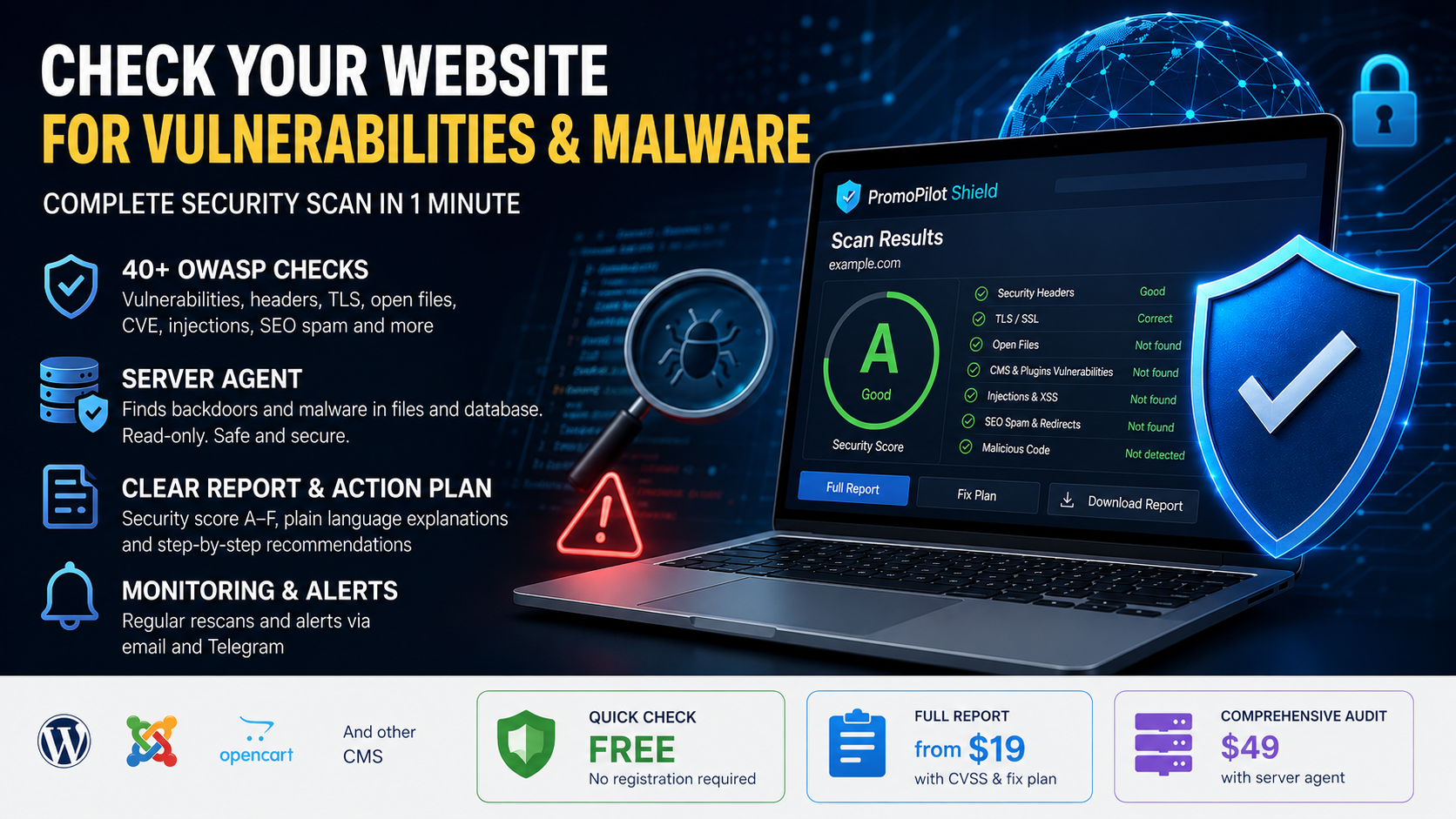
You can run both scans for free in a minute with PromoPilot Shield, a website security scanner. It runs 40+ checks by the OWASP methodology, safely and without exploiting anything, and gives a clear verdict: "Clean", "Vulnerabilities found" or "Infected".
Step-by-step website protection checklist
Even basic measures block most automated attacks. Go through the list:
- HTTPS + HSTS. All traffic over HTTPS, Strict-Transport-Security header enabled.
- Updates. CMS, plugins and themes always current. Delete unused ones.
- Strong passwords + 2FA. A non-dictionary admin login (not
admin), two-factor auth, login attempt limits. - Security headers. CSP, X-Frame-Options, X-Content-Type-Options, Referrer-Policy, Permissions-Policy.
- Close service files. Deny access to
.git,.env, backups,phpinfo, directory listings. - File permissions. Files 0644, directories 0755,
wp-config.php0640. No 777. - Email. Set up SPF, DKIM and DMARC so nobody sends spam in your name.
- Backups. Automatic backups in separate storage + a restore test.
- WAF / protection. Cloudflare or similar in front of the site.
- Monitoring. Regular re-scans and alerts about new threats.
PromoPilot Shield: scan and protect in a minute
PromoPilot Shield covers the whole chain — from "find out what's wrong" to "fix it". Works with WordPress, Joomla, OpenCart and custom sites.
- 40+ OWASP checks — headers, TLS, exposed files, CMS vulnerabilities (1600+ CVE), SSRF/injections, SEO spam, key leaks, blocklists.
- Server-side agent — goes inside and hunts web shells, backdoors and malicious code in files and the database, verifies CMS core integrity. Read-only, changes nothing.
- Clear verdict + AI report — an A–F grade, plain-language explanation and a step-by-step remediation plan.
- Auto-fix — a ready
.htaccessor nginx snippet closes configuration issues instantly. - Monitoring — regular re-scans and email + Telegram alerts when a new threat appears.
Frequently asked questions
How do I know if my site is infected?
Key signs: spam pages of your site in search, redirects to foreign resources, a Google warning, emails in spam, new admins and unknown .php files. A precise answer comes from an inside-out scan — the server agent finds hidden malicious code.
Is scanning safe for my site?
Yes. The scan uses a safe, non-destructive method — without exploiting vulnerabilities. The server agent is read-only and changes nothing.
How is an external scan different from a server scan?
An external scan sees vulnerabilities available to an attacker from outside. A server scan (the agent) finds an infection that has already gotten in — backdoors and malware in files and the database that aren't visible from outside.
What should I do if my site is already hacked?
Change all passwords, take the site offline or enable maintenance mode, find and remove malicious files and DB injections, update the CMS and plugins, restore a clean backup and close the original hole.
How much does a security scan cost?
A quick scan is free. A full report with CVSS and a remediation plan starts at $19; a comprehensive audit with the server agent is $49.