Redirects and 404s: 8 Mistakes on 5,071 Sites (2026)
We checked how 5,071 websites handle redirects and error pages on November 15–16, 2026. The short version: most sites get the basics right (88.1% send HTTP visitors to HTTPS with a permanent redirect), but nearly every other check finds a leak. 7.0% answer on HTTP but do not redirect to HTTPS,…
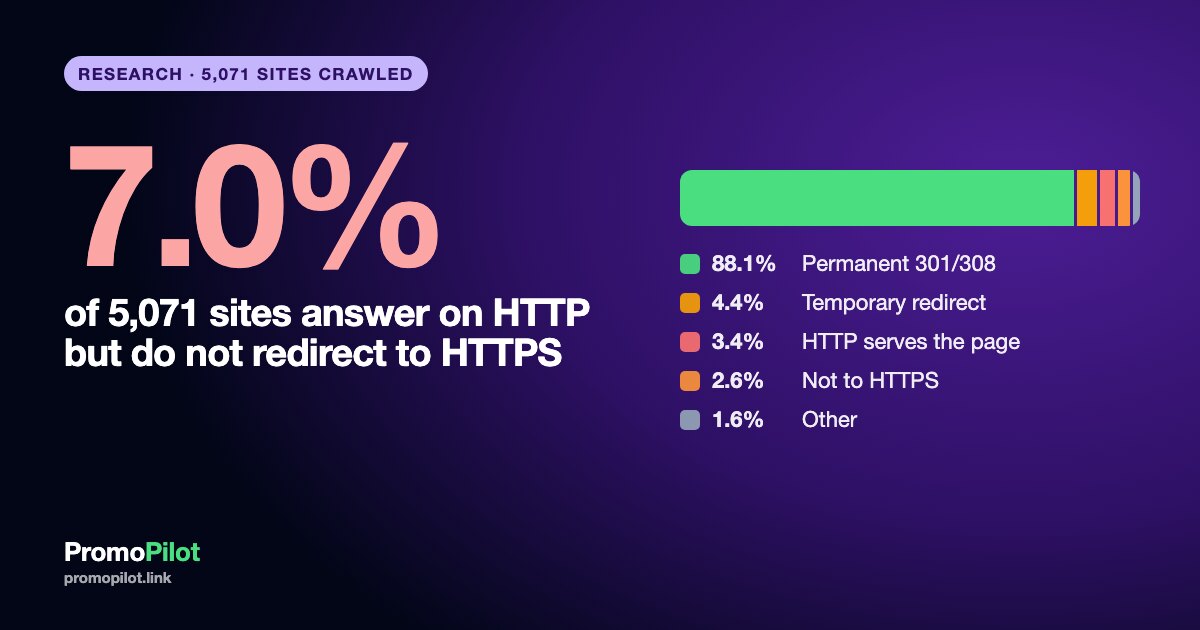
We checked how 5,071 websites handle redirects and error pages on November 15–16, 2026. The short version: most sites get the basics right (88.1% send HTTP visitors to HTTPS with a permanent redirect), but nearly every other check finds a leak. 7.0% answer on HTTP but do not redirect to HTTPS, 5.9% make the homepage take two or more hops, 23.8% have internal pages that open only through a redirect, and 11.2% have at least one internal page that returns an error. This article goes through 8 mistakes in the same order every time: what it looks like, how often we saw it, how to find it, how to fix it. It is written for anyone who is moving a site (HTTP to HTTPS, www to non-www, a new domain, a new URL structure) or cleaning up after a move. Caveat: our sample is non-random (sites from our search-results cache), so the numbers describe this sample, not the whole web.
Data: PromoPilot crawl of 6,000 sites, November 15–16, 2026; 661 sites blocked by a WAF, 178 unreachable and 90 with other errors excluded, 5,071 in the calculation
Key numbers
- HTTP to HTTPS: 92.5% of 5,071 sites send http:// visitors to HTTPS (4,689). On 7.0% (356) HTTP responds but does not redirect to HTTPS: 172 serve the page on plain HTTP while HTTPS works, 131 redirect somewhere other than HTTPS, 28 have no HTTPS at all, 25 return other codes. A further 0.5% (26) do not answer on port 80 at all, which is a different problem.
- Permanent or temporary: of 4,689 sites that do redirect, 95.3% use a permanent code (301 or 308) and 4.7% (222) a temporary one (302, 303 or 307).
- Homepage chain: 56.3% of sites need 0 hops to reach the homepage, 37.8% need 1, 4.8% need 2, 1.1% need 3 or more (299 sites with 2+). 13 sites (0.3%) have a redirect loop. 104 sites (2.1%) end on a different domain.
- www or not: 64.5% of sites end on the non-www host (3,270), 35.5% on www (1,801).
- Internal pages (4,545 sites with sampled pages, about 10 pages each): 23.8% have at least one page that answers with a redirect (1,081); 11.2% have at least one page with an error status (510), 6.3% at least one 404 (285); 17.4% have at least one canonical pointing to another URL (793).
- Sitemap: the address of the sitemap file itself redirects on 4.9% of the 4,126 working sitemaps (201).
- Demand (Google Ads, monthly, worldwide): "redirect checker" 33,100 searches a month, "broken links checker" 27,100, "check 301 redirect" 4,400.
Why a move turns into a redirect job
A redirect is the server telling a browser or a crawler "this address has moved, go there". When you move a site, redirects are the only thing that connects the old address to the new one: they carry visitors and search engines, and they carry the signals that older URLs collected, such as links from other sites. Google's documentation on site moves describes the redirect as the central step and says to keep redirects in place for as long as possible, generally at least 1 year (Google, site moves with URL changes). The demand data fits: "redirect checker" is searched 33,100 times a month and "broken links checker" 27,100 times, which is how most people discover that something went wrong after the move. "Check 301 redirect" (4,400) is the narrower version for people who already suspect the code.
Four kinds of move produce the mistakes below:
- HTTP to HTTPS: every old http:// URL should lead to its https:// twin.
- www to non-www or back: one host version should win and the other should lead to it.
- Domain change: every old URL should lead to the matching new URL on the new domain.
- URL structure change: every old path should lead to its new path, one to one, not to the homepage.
The 8 mistakes are ordered from the one you meet first on a move to the ones that stay hidden for months. Figure 1 shows how common each one is in our sample.

Mistake 1. HTTP does not redirect to HTTPS
What it looks like. You open http://example.com and the page loads on plain HTTP, or the browser shows an error. Both http:// and https:// versions exist, which also means two copies of every page.
How often we saw it. 7.0% of 5,071 sites (356) respond on HTTP but do not redirect to HTTPS. In 172 cases (3.4%) HTTP serves the page itself although HTTPS works; 28 sites have no HTTPS at all and serve HTTP; 131 (2.6%) redirect somewhere, but not to HTTPS according to our check; 25 return other codes (403, 404, 5xx). Separately, 26 sites (0.5%) do not answer on port 80 at all. We count them as "HTTP unavailable" and not in the 7.0%: some may be HTTPS-only sites with port 80 closed on purpose, but a visitor who types http:// gets a timeout instead of a page. HSTS, the header that tells browsers to use HTTPS only, is sent by 52.9% of all sites (2,682).
How to find it. Type the http:// address of your homepage and of two or three inner pages into the redirect checker: you want one hop with a 301 or 308 to the https:// address of the same page. Repeat with the www version of the host.
How to fix it. Add one server-level rule that sends every http:// request to the same path on https://, with a 301 (or 308). Do it at one layer only (the server, the CDN or the CMS, not all three). After it works, update internal links, canonicals and the sitemap to https:// and add the https:// property in Search Console. Consider HSTS once everything works over HTTPS, because it is hard to undo quickly.

Mistake 2. A temporary redirect where a permanent one is needed
What it looks like. The move works for visitors, but the response code is 302, 303 or 307 instead of 301 or 308. For a person nothing changes. For a search engine a temporary code says "the old address is still the real one", so it may keep the old URL as the main one.
How often we saw it. Among the 4,689 sites that redirect HTTP to HTTPS, 4.7% (222) use a temporary code: 187 use 302, 33 use 307, 2 use 303. The other 95.3% (4,467) use 301 (4,239) or 308 (228).
How to find it. The redirect checker prints the status code of every hop. Look for 302, 303 and 307 where the move is meant to be final.
How to fix it. Use 301, or 308 if you need the request method preserved. Many hosting panels and CMS plugins default to 302 for "redirect" buttons, so check the code, not only the destination. Use a temporary code only when the move really is temporary (a maintenance page, an A/B test). Google's redirect documentation treats permanent redirects as a strong signal that the target should be the canonical URL and temporary ones as a weak signal.
Mistake 3. Redirect chains (and the www hop)
What it looks like. Old URL goes to A, A goes to B, B goes to the final page. A typical chain after a move: http://example.com goes to https://example.com, then to https://www.example.com, then to https://www.example.com/ (a slash added). Each hop is a separate request and a chance for something to break.
How often we saw it. Counting hops from the address in our cache to the final homepage: 56.3% need none, 37.8% one, 4.8% two and 1.1% three or more, so 5.9% of sites (299) have a chain of 2+ hops. The host choice matters. All 1,801 sites that end on www need at least one hop from our starting address, and 13.8% of them need two or more; of the 3,270 sites that end on non-www, 87.4% need no hop and only 1.5% need two or more. We cannot see the individual rules, but a chain of this kind is what you get when the HTTPS rule and the www rule are separate steps. Treat the www comparison with care: the hops are counted from the address in our cache, which is often the bare domain, so a site that ends on www has at least one hop by construction. It shows a pattern in this sample, not that www causes chains.

How to find it. The redirect checker shows the whole chain with codes. Test four variants: http://example.com, http://www.example.com, https://example.com, https://www.example.com. Each should reach the final URL in one hop at most.
How to fix it. Send every old variant straight to the final URL (https, your chosen host, the final path), not to the next step in the chain. By default Google's crawlers follow up to 10 redirect hops (see Google's documentation), but each extra hop costs time and, in a move, chains multiply: the new redirects get added to the old ones. After a second or third move, re-point the oldest rules directly to the current URL.
www or non-www? Either works; consistency matters. Among our sites 64.5% settled on non-www and 35.5% on www. Pick one, redirect the other to it with one permanent rule, and use it in canonicals, sitemaps and internal links. Switching later is a full move, so choose once.
Mistake 4. A redirect loop
What it looks like. The browser shows "too many redirects" or "ERR_TOO_MANY_REDIRECTS". Address A leads to B and B leads back to A, so nobody ever reaches the page.
How often we saw it. 13 of 5,071 sites (0.3%) loop on the homepage. It is rare, but it is the most expensive mistake on the list because a looping homepage is unreachable for people and crawlers.
How to find it. The redirect checker stops at a repeated address and tells you which two URLs bounce. Test both HTTP and HTTPS and with and without www.
How to fix it. The usual cause is two layers that disagree: for example a CDN or proxy that talks to the origin over HTTP while the origin forces HTTPS, or a www rule in the CMS that fights a non-www rule in the server config. Keep one source of truth for each rule (HTTPS, host, trailing slash) and remove the duplicates. If a CDN sits in front, set its SSL mode so that it connects to the origin over HTTPS.
Mistake 5. The homepage ends on another domain
What it looks like. The old domain no longer shows its own site; its homepage redirects to a different domain. After a planned move this is exactly the result you want. It becomes a mistake when it was not planned: a leftover rule from a staging site, a redirect added during a rebrand that was later undone, a domain redirected to a parent brand.
How often we saw it. 104 of 5,071 sites (2.1%) end on a different domain from the one in our cache. Our data cannot tell a finished move from an accident, so read this as the share of cached addresses that have moved or are handed off elsewhere.
How to find it. Check the homepage and your 10 most important inner pages in the redirect checker, and compare the destination host with what you expect. For a domain move, test old URLs in bulk: each should reach the matching page, not the new homepage.
How to fix it. For a planned domain change, map every old URL to its new equivalent (same path where possible), redirect with 301 and use the Change of Address tool in Search Console for the old domain (it applies to domain moves, not to HTTP to HTTPS or www changes). You must be an owner of both the old and the new property in Search Console, under the same Google account, and the tool's effect lasts 180 days (Google's help). Keep the old domain registered and redirecting for generally at least 1 year, as Google says in its site move guide. For an unplanned one, find the rule in the server, CDN or domain registrar panel and remove it.
Mistake 6. Internal links and the sitemap point to redirecting URLs
What it looks like. The redirects exist, but the site still links to the old addresses: menus, article links and the sitemap contain http:// URLs, old paths or addresses without the trailing slash. Every click and every crawl takes an extra hop that was never needed.
How often we saw it. Among 4,545 sites where we sampled about 10 internal pages each, 23.8% (1,081) have at least one sampled page that answers with a redirect, and on 3.7% (167) half of the sampled pages or more do. On the sitemap side, the address of the sitemap file itself redirects on 4.9% of 4,126 working sitemaps (201). We did not test the URLs listed inside the sitemaps. Some redirects among internal pages are harmless (a CMS adding a slash), but they are still avoidable.
How to find it. Run a crawl with the site audit and look for internal links with a 3xx status. Open the sitemap analyzer to check the sitemap address and status.
How to fix it. After any move, replace the old URLs in templates, menus, content and the sitemap with the final ones (search and replace in the database for the host or scheme change). The redirect then stays as a safety net for external links, not as the way your own pages reach each other. Tell Search Console the new sitemap address and remove the old one.

Mistake 7. Internal pages that return errors (404 and others)
What it looks like. A link on your own site leads to a page that returns 404 (not found), 410 (gone) or a 5xx error. After a move this is what you see when old URLs were not redirected or were redirected to the wrong place.
How often we saw it. Among 4,545 sites with sampled internal pages, 11.2% (510) have at least one sampled page with an error status, 6.3% (285) at least one 404, and 1.3% (61) have errors on half of the sampled pages or more. At page level the picture is calmer: about 43,000 sampled internal pages returned 404 in 0.9% of cases. The error group also includes 403 and 429, which can be crawler blocks rather than broken pages, so 11.2% is an upper estimate and 6.3% for 404 is the cleaner number.
How to find it. Use the broken links checker for a list of broken links on a page, and the Pages report in Search Console for "Not found (404)" URLs Google already knows. Check backlinks too: external links pointing to dead URLs are lost value.
How to fix it. Fix the cause by case. If the page moved, add a 301 to its new address. If the page was removed for good and has no equivalent, a real 404 or 410 is correct and honest. Do not redirect every dead URL to the homepage: Google may treat that as a soft 404 and it confuses visitors. If the link is yours, update it so it points to a live page.
Mistake 8. Canonicals that point to old or wrong URLs
What it looks like. The page loads fine, but its rel="canonical" tag names a different URL, often the old domain, the http:// version or a path that no longer exists. You told search engines that the other address is the real one.
How often we saw it. Among 4,545 sites with sampled internal pages, 17.4% (793) have at least one sampled page whose canonical points to another URL, and 3.9% (175) have it on half of the sampled pages or more. On the homepage alone, 3.7% (180 of 4,874 with a readable tag). Many such canonicals are deliberate (variants, syndicated content, filtered lists), so this is a list to review, not a count of errors. Our data does not show where each canonical points.
How to find it. After a move, view the source of the homepage and a few key pages and read the canonical link. The site audit lists pages whose canonical differs from their own URL.
How to fix it. Make each indexable page's canonical its own final URL (https, chosen host, current path). A canonical pointing to the old domain after a move is a common leftover from theme settings or SEO plugins, and it works against the redirect that you just built.
The mistakes as a table
| Mistake | Sites | Share | Where to check |
|---|---|---|---|
| 1. HTTP responds but does not redirect to HTTPS | 356 of 5,071 | 7.0% | Redirect checker |
| HTTP unavailable (no answer on port 80), a different problem | 26 of 5,071 | 0.5% | Redirect checker |
| 2. Temporary redirect instead of permanent | 222 of 4,689 | 4.7% | Redirect checker |
| 3. Homepage chain of 2+ hops | 299 of 5,071 | 5.9% | Redirect checker |
| 4. Redirect loop | 13 of 5,071 | 0.3% | Redirect checker |
| 5. Homepage ends on another domain | 104 of 5,071 | 2.1% | Redirect checker |
| 6a. Internal pages answer with a redirect | 1,081 of 4,545 | 23.8% | Site audit |
| 6b. Sitemap file address redirects | 201 of 4,126 | 4.9% | Sitemap analyzer |
| 7. Internal pages return errors | 510 of 4,545 | 11.2% | Broken links checker |
| 8. Canonical points to another URL | 793 of 4,545 | 17.4% | Site audit |
For crawler rules that can block a moved site by accident, also check robots.txt after the move: a leftover Disallow from a staging site is a common companion of these mistakes.
Order of work on a move
If you are about to move, do it in this order: first list the old URLs (from the sitemap, your analytics and Search Console), then build the old-to-new map, then put the redirects live, then update internal links, canonicals and the sitemap, then run the checks above on a sample of 50 to 100 old URLs and fix what fails, and only then tell Search Console about the change. Keep watching the Pages report for a few weeks: errors from old URLs appear there with a delay. This article does not promise that rankings will hold, only that these are the mistakes that most often make a move harder than it needs to be.
Methodology and limitations
Data comes from the PromoPilot website crawl (TRI) of 6,000 sites from our search-results cache, collected November 15–16, 2026. We excluded 661 sites that blocked the crawler (WAF and similar), 178 unreachable and 90 with other errors, leaving 5,071. For each site we requested the homepage, the http:// version, and about 10 internal pages (4,545 sites have such a sample; the rest had no usable internal pages). Hops are counted from the address stored in our cache to the final homepage, so the www result partly reflects which form of the address we started from. The share of pages with errors, redirects or other canonicals is computed per site, and a site is counted if at least one sampled page has it; with at most 10 sampled pages the smallest non-zero share is 10%. Error statuses include 403 and 429, which can be crawler blocks.
Limitations: the sample is not random and cannot be transferred to the whole web; sites that block crawlers are excluded and are probably better protected and larger; we measured what the site answers now, not how or why it was set up, and not the effect on rankings or traffic; we did not test the URLs inside sitemaps; we cannot tell planned moves from accidents. The data contains no client projects and no domains. The aggregates are published as CSV under CC BY 4.0. Demand figures are monthly Google Ads volumes for the whole world, rounded by Google.
FAQ
How do I check a 301 redirect?
Enter the old URL into a redirect checker and read the status code of every hop and the final URL. You want one hop with 301 (or 308) to the exact new address. Test the http://, https://, www and non-www variants, because each may behave differently.
What is the difference between 301, 302 and 308?
301 and 308 are permanent: the content has moved for good, and search engines should treat the new URL as the main one. 302 and 307 are temporary. 308 and 307 keep the request method (POST stays POST), 301 and 302 historically may change it. For a site move use 301 or 308.
How many redirects in a row are too many?
The goal is one hop. In our sample 5.9% of sites need two or more to reach the homepage. By default Google's crawlers follow up to 10 redirect hops (Google's documentation), but chains slow visitors down and make a move harder to maintain, so re-point old rules to the final URL.
Should I use www or non-www?
Either is fine. In our sample 64.5% of sites end on non-www and 35.5% on www. What matters is to choose one, redirect the other to it with a permanent rule, and use the chosen form in links, canonicals and the sitemap.
How long should I keep redirects after a move?
Generally at least 1 year, says Google's guide to site moves, and longer if old URLs still get traffic or backlinks. Removing them early turns the old URLs into 404s.
Should I redirect all 404 pages to the homepage?
No. Redirect a removed page to its closest equivalent. If there is none, return a real 404 or 410. Mass redirects to the homepage are usually treated as soft 404s and do not help visitors.
Sources
- Google Search Central, Redirects and Google Search: developers.google.com
- Google Search Central, Site moves with URL changes: developers.google.com
- Google Search Central, Change of Address tool: support.google.com
- Google Search Central, HTTP status codes and how Googlebot treats them: developers.google.com
How to cite
PromoPilot (2026). Redirects and 404s: 8 mistakes we found on 5,071 sites. Data November 15–16, 2026. CC BY 4.0: https://promopilot.link/uploads/blog/research/redirects-404-2211/redirects-404-5071-sites-2026-11.csv . Article: https://promopilot.link/en/blog/redirects-and-404s-8-mistakes-5071-sites-2026
Download the data
The aggregate tables (CSV, license CC BY 4.0): https://promopilot.link/uploads/blog/research/redirects-404-2211/redirects-404-5071-sites-2026-11.csv, plus the tables https://promopilot.link/uploads/blog/research/redirects-404-2211/redirects-404-chain-length-2026-11.csv, https://promopilot.link/uploads/blog/research/redirects-404-2211/redirects-404-www-vs-non-www-2026-11.csv. It contains aggregates only, no projects, domains or client data.