How to opt out of AI Overviews: Google puts every control on one page
On 21 October Google listed every way to limit how a site appears in Search on one page, including the Search Console opt-out from AI Overviews and AI Mode. We checked robots.txt and homepages of the top 1,000 sites.
On 21 October 2026 Google updated its page "Control what you share with Google Search". It now lists in one place every option a site owner has: the robots meta tag, data-nosnippet, the X-Robots-Tag header and the Search generative AI control in Search Console. That control is the only switch that removes a site from AI Overviews and AI Mode without touching normal results. We checked which of these options the largest sites already use.
What the Search generative AI control does
- Where: Search Console, Settings, Search generative AI. Three options: Include (the default), Exclude, or inherit the setting of the parent property.
- What it covers: AI Overviews, AI Mode and generative AI features in Google Discover. Google says the list may change.
- What Exclude means: your links and content are not shown in these features and are not used to generate their answers. You also get no impressions or clicks from them.
- What it does not touch: Google says the setting is not used as a ranking or inclusion signal for the rest of Search. It does not affect AI training (that is Google-Extended in robots.txt) and does not remove the site from Search (that is
noindex). - Timing: changes usually take a few days. According to the help page, the control has been available to all sites worldwide since 31 August 2026.
Which tool does what
| Option | Where | Effect |
|---|---|---|
| Search generative AI control | Search Console | Removes the whole site or a property from AI Overviews, AI Mode and Discover AI features |
nosnippet, max-snippet | robots meta tag or X-Robots-Tag | Limits snippets for a page, in normal results and in AI features |
data-nosnippet | HTML attribute | Hides a part of a page from snippets |
| Google-Extended | robots.txt | Opts out of training Gemini models, not of Search |
noindex | robots meta tag or X-Robots-Tag | Removes the page from Search completely |
What we checked
On 27 October we opened the robots.txt and the homepage of the 1,000 most visited domains from the Tranco list. Many of these domains are CDNs and services without a website, so we counted only sites that returned a readable robots.txt (495) or homepage (513).
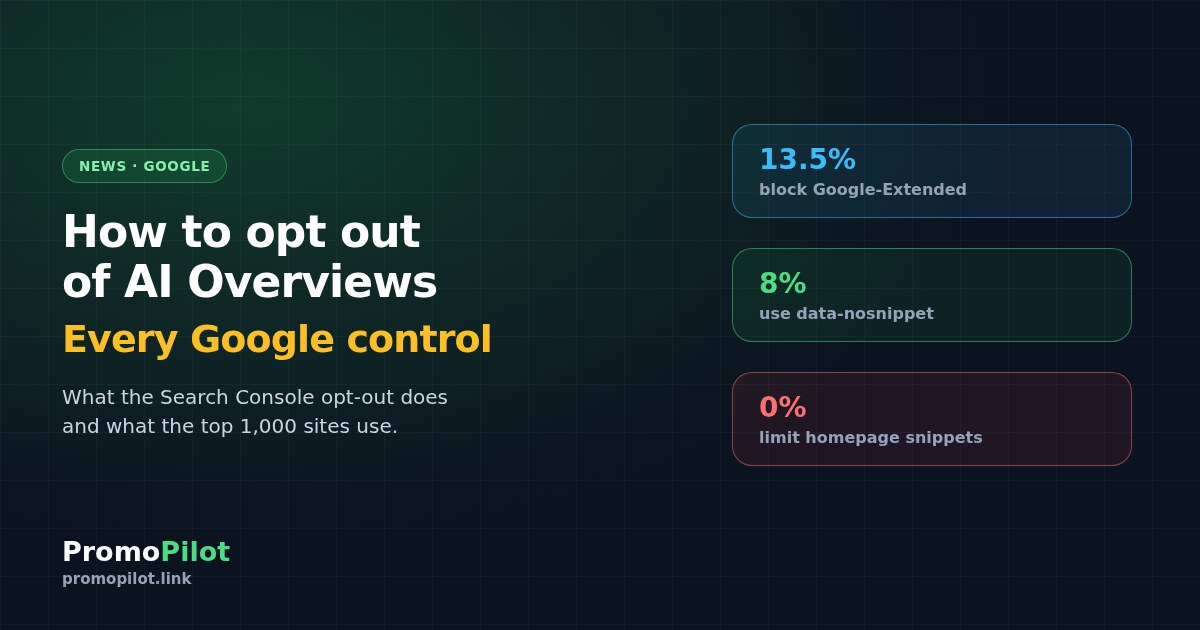
- 67 of 495 sites (13.5%) block Google-Extended for the whole site. GPTBot is blocked by 84 sites (17%) and CCBot by 90 (18%). Among those blocking Google-Extended are large publishers and platforms.
- 0 of 513 homepages use
nosnippetor a limitedmax-snippet. Large sites do not cut their snippets: it would hurt normal results too. - 41 of 513 homepages (8%) use
data-nosnippetto hide parts of the page, usually banners, prices or service blocks.
The Search Console setting itself cannot be seen from outside. But the picture is clear: sites limit model training much more often than their presence in search answers. Our earlier check found AI Overviews on 73% of results pages for SEO tool queries, so leaving them is a real loss of impressions.
What it means for a website
- Do not exclude the site without numbers. First look at the Generative AI report in Search Console, as described in our article: how many impressions and clicks AI features already bring.
- If you want to stay in search but not in training, Google-Extended in robots.txt is enough. Check the file with our robots.txt checker.
- If only part of a page should not be quoted, use
data-nosnippetinstead of excluding the whole site. - Remember the inheritance. A subdomain or folder property follows its parent. One wrong switch on the domain property affects all of them.
Sources: Google Search Central documentation updates log, entry of 21.10.2026; Google Search Central, "Control what you share with Google Search"; Search Console Help, "Search generative AI control"; PromoPilot check of robots.txt and homepages of the Tranco top 1,000, 27.10.2026. Prepared by the PromoPilot team.