Is This Website Legit? 12 Signs to Check (5,071 Sites)
Black Friday is on November 27, 2026, and "is this website legit" is searched about 49,500 times a month in the US alone, up 400% over the year. This guide gives you 12 signs to check before you enter a card number, and for each one a free way to check it and a number from our own crawl of 5,071…
Black Friday is on November 27, 2026, and "is this website legit" is searched about 49,500 times a month in the US alone, up 400% over the year. This guide gives you 12 signs to check before you enter a card number, and for each one a free way to check it and a number from our own crawl of 5,071 websites. Important framing: our sites are mostly ordinary, legitimate sites that appear in search results, so the numbers show what a normal site looks like, a baseline to compare a shop against. They are not a count of scams. No single sign proves a site honest or dishonest; you look at several together. Caveat: the sample is non-random (sites from our search-results cache), so do not extend it to the whole web.
Data: PromoPilot crawl of 6,000 sites, November 15–16, 2026; 661 sites blocked by a WAF, 178 unreachable and 90 with other errors excluded, 5,071 in the calculation
Key numbers
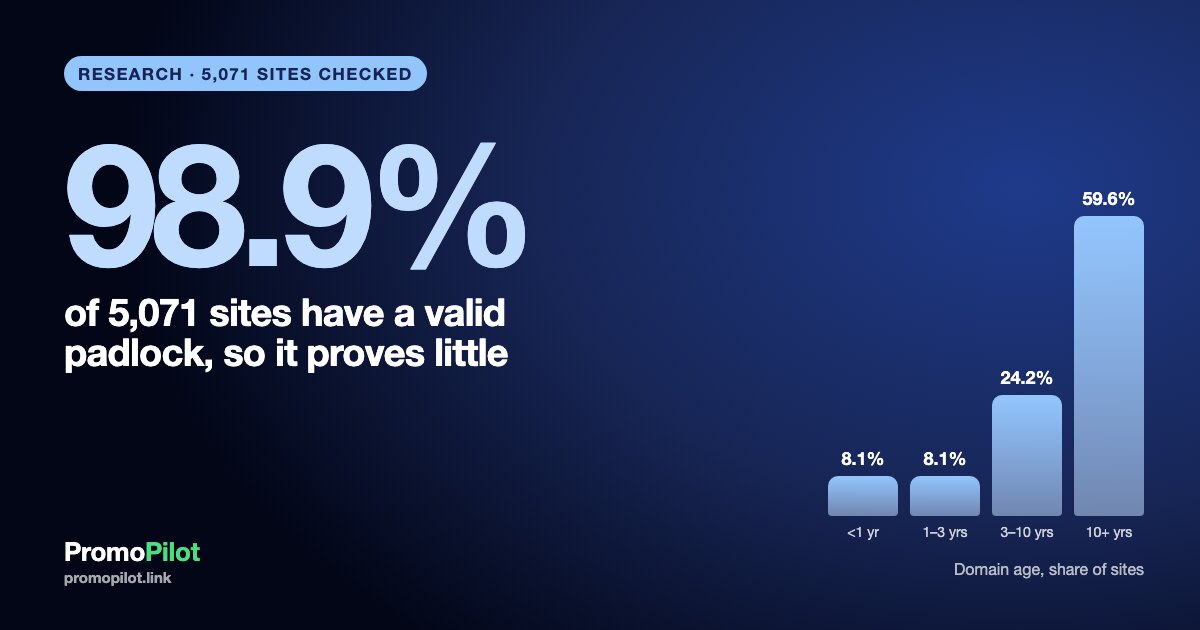
- Domain age: of the 3,255 sites with a known registration date, 8.1% are younger than 1 year (264), 8.1% are 1 to 3 years, 24.2% are 3 to 10 years and 59.6% are 10 years or older. The median is 12.8 years. For another 1,816 sites (35.8%) the registry shows no creation date.
- The padlock is nearly universal: 98.9% of 5,071 sites have a valid certificate (5,015). Among domains younger than 1 year it is 98.5%, among domains 10 years and older 99.0%. So a padlock does not separate new from established sites.
- Free certificates are normal: Let's Encrypt issued 49.7% of the valid certificates, Google Trust Services 23.7%, and 42.2% of certificates were issued in the last 30 days. The median certificate is 35 days old.
- Email: MX records on 88.9% of sites, SPF on 85.9%, DMARC on 67.3%. Among domains younger than 1 year DMARC is 42.8%, among those 10 years and older 75.0%.
- HSTS on 52.9% of sites; Organization markup (schema.org) on 39.5%, LocalBusiness on 3.8%.
- The address leads to another domain on 2.1% of sites (104); three or more redirects on 1.1% (56).
- Demand (Google Ads, monthly): "is this website legit" 49,500 in the US (up 400% over the year), "domain name age checker" 9,900 (up 83%), "check a domain" 246,000 (up 22%).
How to use this checklist
Five minutes is enough for a first pass. Open the shop, type its domain into the free tools linked below, and tick the signs in order. Each sign has three parts: what to look at, how to check it for free, and what we saw on 5,071 sites. The "what we saw" line is the baseline: if a shop differs from it on one sign, that is normal (many good small shops have no DMARC record), but if it differs on several at once, slow down. Table 1 gives the whole list on one screen.
| # | Sign | Free check | What we saw |
|---|---|---|---|
| 1 | Domain age | Domain Age | 8.1% younger than 1 year, median 12.8 years |
| 2 | Registration record | WHOIS Lookup | No creation date for 35.8% |
| 3 | HTTPS and a valid certificate | SSL Checker | 98.9% have a valid certificate |
| 4 | Who issued the certificate | SSL Checker | 49.7% Let's Encrypt, 14.6% DigiCert, GlobalSign or Sectigo |
| 5 | Where the address leads | Redirect Checker | 2.1% end on another domain |
| 6 | Security headers | Security Headers | HSTS on 52.9% |
| 7 | A working mail setup | MX Lookup, SPF, DMARC | MX 88.9%, SPF 85.9%, DMARC 67.3% |
| 8 | Company data in the markup | View source, Domain Trust | Organization markup on 39.5% |
| 9 | History in the web archive | Web archive, Domain Age | 93.4% have archived pages |
| 10 | A site that is maintained | Website Status | Title 93.4%, mobile tag 92.7% |
| 11 | Server and IP reputation | IP Blacklist | Not measured |
| 12 | Contacts, policies, payment, reviews | By hand | Not measured |
The 12 signs
1. How old is the domain
What to look at. The date the domain name was first registered. A shop that claims "ten years of experience" on a domain registered three weeks ago deserves a question. Shops set up for short-lived fraud often use new domains, because an old reputation is expensive to build. But new domains also belong to every legitimate start-up and every rebrand, so age is a reason to look closer, never a verdict.
How to check. Enter the domain into our free Domain Age tool: it shows the registration date, expiry date and registrar. Compare the date with the story the site tells.
What we saw on 5,071 sites. Of 3,255 sites with a known registration date, 59.6% are 10 years or older, 24.2% are 3 to 10 years, 8.1% are 1 to 3 years and 8.1% are younger than 1 year (264 sites). Only 2.2% (71) are younger than 90 days. The median age is 12.8 years. Remember that this is a sample of sites that already appear in search results, which skews old; a typical new shop will look different.

2. What the registration record says
What to look at. The registrar, the creation and expiry dates, the name servers and whether the owner is shown. Since privacy rules came in, most records hide the owner's name, and that is normal for both big brands and small shops. A hidden owner alone proves nothing. What helps is consistency: a company that lists a physical address on its site and a registration made in the same country and year it says it was founded.
How to check. Use WHOIS Lookup, or the official lookup of ICANN at lookup.icann.org. If the creation date is missing, try the web archive (sign 9).
What we saw on 5,071 sites. For 1,816 sites (35.8%) the registry data we use does not show a creation date at all. Many country-code domains do not publish it in the standard format. So a missing date is common, not a warning by itself.
3. HTTPS and a valid certificate
What to look at. The address must start with https, the browser must show no certificate warning, and the certificate must be issued for this exact domain and not expired. Never type card details on a page that warns about the certificate or runs on plain http.
How to check. SSL Checker shows the domain names covered, the validity dates and the chain. A mismatch between the domain you typed and the certificate name is a stop sign.
What we saw on 5,071 sites. 98.9% have a valid certificate (5,015), 99.3% end up on https and 92.5% redirect plain http to https. Only 0.7% (34) have a certificate that fails validation. The padlock is therefore the entry ticket, not proof of honesty: among domains younger than 1 year 98.5% have a valid certificate, among domains 10 years and older 99.0%. A padlock means the connection is encrypted, nothing about who runs the shop.
4. Who issued the certificate (and why free is fine)
What to look at. The issuing authority. Many people think a free certificate means a throw-away site. The data says otherwise: free, automated certificates are the default for the web. Browsers also stopped showing the company name next to the padlock years ago, so the issuer does not tell you who the owner is.
How to check. The issuer and the validity period are shown in SSL Checker. A certificate issued yesterday is normal, since automated certificates renew every 60 to 90 days.
What we saw on 5,071 sites. Of the 5,015 valid certificates, Let's Encrypt issued 49.7% (2,490), Google Trust Services 23.7% (1,191), DigiCert 5.6%, GlobalSign 5.5%, Amazon 5.5% and Sectigo 3.5%. Together Let's Encrypt, Google Trust Services and ZeroSSL account for 74.3%, and DigiCert, GlobalSign and Sectigo for 14.6%. The median certificate is 35 days old and 42.2% were issued within the last 30 days. Free certificates are not a scam sign.

5. Where the address really leads
What to look at. Type the address from an ad or a message and see where you land. Lookalike domains (a letter swapped, a hyphen added, a different ending) are a common trick around shopping events. Also note whether the final domain matches the brand you expected. A redirect to another domain is sometimes legitimate (a brand moved, a regional store), so judge by whether the new name makes sense.
How to check. Redirect Checker shows each step and the final address. Website Status shows the final status code too.
What we saw on 5,071 sites. 56.3% have no redirect at all (2,857) and most others have one (the move from http to https or to www). The address ends on a different domain for 2.1% (104), and three or more redirects in a row occur on 1.1% (56). A long chain across several domains is unusual in our sample, so it is worth a closer look.
6. Security headers
What to look at. Response headers such as HSTS tell the browser to always use https for this site. They are set by whoever manages the server, so they show technical care, not honesty.
How to check. Security Headers gives a grade and lists what is missing.
What we saw on 5,071 sites. HSTS is present on 52.9% (2,682), X-Frame-Options on 42.4% and a content security policy on 29.2%. Domains younger than 1 year have HSTS in 43.6% of cases, 10 years and older in 59.1%. Do not penalize a shop for missing headers: about half of normal sites lack HSTS.
7. A working mail setup
What to look at. A real business receives mail on its own domain. MX records say that the domain can receive mail, SPF says which servers may send for it, DMARC says what to do with forged mail. If a shop only has a free webmail address as its contact, ask why.
How to check. MX Lookup, SPF Checker and DMARC Checker. Each takes the domain and shows the record in plain language.
What we saw on 5,071 sites. MX records on 88.9% (4,507), SPF on 85.9% (4,354), DMARC on 67.3% (3,414); 38.4% (1,945) use the enforcing policies quarantine or reject. Among sites that have MX, 94.5% have SPF and 73.9% have DMARC. The gap between ages is large: DMARC on 42.8% of domains younger than 1 year against 75.0% of those 10 years and older, and MX records on 63.3% against 92.7%. A missing record is not a verdict (11.1% of sites have no MX), but a shop that sells to you and cannot receive mail on its own domain is odd.

8. Company data in the page markup
What to look at. Many sites describe the company in hidden structured data (schema.org): name, address, phone, logo, social profiles. It does not prove anything, since anyone can write it, but legitimate businesses tend to keep it consistent with the visible contact page. Compare the name, address and phone in the footer, on the contact page and in the markup.
How to check. View the page source and search for "Organization" or "LocalBusiness", or run the domain through Domain Trust, which checks trust signals including Schema.org.
What we saw on 5,071 sites. Organization markup on 39.5% (2,003), LocalBusiness on 3.8% (195), any schema.org type on 64.8%. Domains younger than 1 year have Organization markup more often (56.4%) than those 10 years and older (36.7%), because newer sites are built on templates that add it. This is the weakest sign on the list: use it only to check consistency.
9. History in the web archive
What to look at. Whether the web archive has copies of the site and what it looked like earlier. A shop with a long history that suddenly sells something unrelated, or a "ten-year-old" shop with no past, are both reasons to ask questions. Domains also change hands, so old does not always mean the same owner.
How to check. Search the address in the Internet Archive (web.archive.org). Our Domain Age tool shows the registration date to compare with the first capture.
What we saw on 5,071 sites. 93.4% have at least one archived capture (4,738); the median first capture is 13.7 years ago. 3.8% (179) were first archived less than a year ago. Our sample is made of sites already visible in search, which makes a missing archive record rarer here than for a brand-new shop.
10. A site that is maintained
What to look at. Working inner pages, a page title, a readable layout on a phone, a stated language, no broken links on the main path. A shop whose product pages return errors, or whose home page has a few lines of text, is either unfinished or abandoned.
How to check. Website Status for availability and response time; click the menu, the policy pages and one product page yourself.
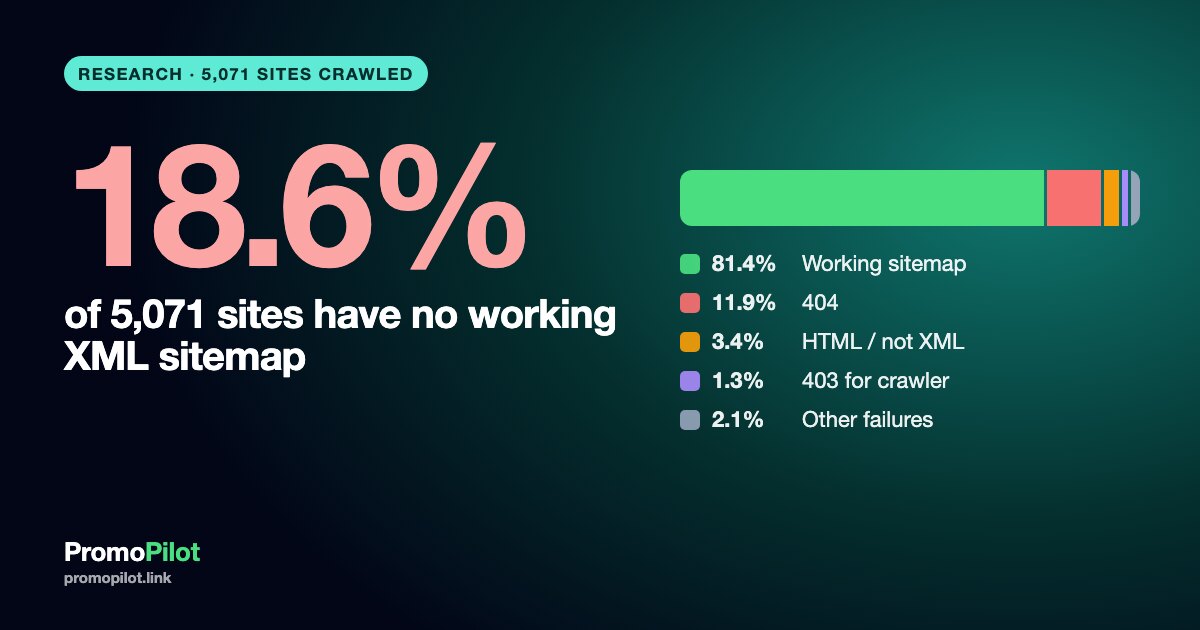
What we saw on 5,071 sites. A page title on 93.4%, a mobile viewport tag on 92.7%, a declared language on 88.1%, a robots.txt on 94.1% and an XML sitemap on 81.4%. In a sample of inner pages 84.4% of sites had 90% or more of them load without errors. The median home page has about 960 words, and 12.3% (626) have fewer than 100 words.
11. Server and IP reputation
What to look at. Whether the server's IP address is on spam and abuse lists. A shop that sends your order confirmation from a listed server may land in spam, and a listed address is a reason to look closer. Shared hosting means a neighbor can be the reason, so treat it as one input.
How to check. IP Blacklist checks the address against major lists. Find the address first with Domain IP.
What we saw on 5,071 sites. We did not measure this in the crawl, so we give no number.
12. The human checks: contacts, policies, payment, reviews
What to look at. No tool replaces these. Is there a real address, a phone number and a company name that match across the site? Are shipping, return and privacy policies written for this shop and not copied? Does the shop offer a normal payment method with buyer protection (a card or a known wallet) rather than only a bank transfer or crypto? Are prices believable against other sellers? Do reviews appear on independent platforms and not only on the shop itself? Search the shop name together with the word "reviews" and read the newest items, not the most flattering ones.
How to check. By hand, in five minutes, with a search engine and the shop's own policy pages.
What we saw on 5,071 sites. Our crawler did not look for contact pages or policies, so we give no number.
How to put the signs together
- One difference from the baseline is normal. Many good small shops have no DMARC record or no HSTS header.
- Two or three differences that point the same way (a domain registered last month, an address that ends on another domain, no mail setup, no policy pages, no independent reviews) are a reason to stop and buy elsewhere.
- Stop at once if the certificate does not match the domain, if the browser shows a warning, if the only payment is a bank transfer or crypto, or if the price is far below every other seller.
- If you must pay a new shop, use a card, not a transfer, and keep screenshots of the order and the policies.
What we found, in short
A typical site in our sample is 12.8 years old, has a valid certificate, receives mail on its own domain and does not redirect you anywhere unexpected. The padlock, the certificate issuer and HSTS do not separate old from new sites, so do not spend time on them. Domain age, mail setup and the human checks do separate them, and they are the ones to do first.

Methodology and limits
On November 15–16, 2026 we crawled 6,000 sites taken from our search-results cache. We excluded 661 sites that blocked the crawler with a WAF or similar protection, 178 that were unreachable and 90 with other errors, which leaves 5,071 sites. Domain age comes from registry data (RDAP) and is known for 3,255 sites; age shares use that base. Certificates were read over TLS; DNS records were queried directly; headers and redirects come from the home page request; markup from the home page HTML. Shares are shares of sites, with the base stated.
The limits: the sample is not random and consists of sites that already appear in search results, so it is older, better maintained and more technical than the whole web, and it contains very few of the short-lived fraud shops that never reach search. For that reason the numbers are a baseline of normal sites, not a count of scams. Sites that blocked us are excluded. The crawl did not check contacts, policies, prices, payment methods, reviews or blacklists. The data contains no client projects and no domains. The aggregates are published as CSV under CC BY 4.0.
FAQ
How can I tell if a website is legit?
Check several signs together: the age of the domain, a valid certificate for the exact domain, where the address leads, a working mail setup, real contact details and policies, and independent reviews. No single sign is proof, and our data shows that most normal sites pass the technical ones.
Is a site with a padlock safe?
The padlock means the connection to the site is encrypted. In our data 98.9% of sites have a valid certificate, including 98.5% of domains younger than a year, so the padlock does not tell you whether the owner is honest.
Is a new domain a sign of a scam?
No. In our sample 8.1% of sites with a known date are younger than a year and are ordinary sites. A new domain is a reason to check the other signs more carefully, especially if the shop claims a long history.
Does a free SSL certificate mean the site is fake?
No. 49.7% of valid certificates in our sample come from Let's Encrypt, which is free, and 74.3% from free or automated issuers. Free certificates are the normal way to run a site now.
How do I check how old a domain is for free?
Use our free Domain Age tool or WHOIS Lookup. If the date is hidden, compare it with the first copy in the Internet Archive.
What should I do before Black Friday purchases?
Type the shop's address yourself instead of following a link from a message, run the 12 checks above, pay by card, and keep screenshots of the order and the return policy. If two or three signs point to a problem, buy elsewhere.
Sources
- Let's Encrypt, about the authority and 90-day certificates: letsencrypt.org
- ICANN registration data lookup: lookup.icann.org
- MDN, Strict-Transport-Security header: developer.mozilla.org
- Internet Archive: web.archive.org
How to cite
PromoPilot (2026). Is this website legit? 12 signs and how to check them, with data from 5,071 sites. Data November 15–16, 2026. CC BY 4.0: https://promopilot.link/uploads/blog/research/legit-site-signs-2011/legit-site-signs-5071-2026-11.csv . Article: https://promopilot.link/en/blog/is-this-website-legit-12-signs-how-to-check-5071-sites-2026
Download the data
The aggregate tables (CSV, license CC BY 4.0): https://promopilot.link/uploads/blog/research/legit-site-signs-2011/legit-site-signs-5071-2026-11.csv, plus the tables https://promopilot.link/uploads/blog/research/legit-site-signs-2011/legit-site-age-buckets-2026-11.csv, https://promopilot.link/uploads/blog/research/legit-site-signs-2011/legit-site-cert-issuers-2026-11.csv, https://promopilot.link/uploads/blog/research/legit-site-signs-2011/legit-site-young-vs-old-2026-11.csv. It contains aggregates only, no projects, domains or client data.