
Notifications: Types and Where They Are Sent
The platform reports events through four channels: in the dashboard, by email, in Telegram, and push notifications in the mobile app. Each type of event is configured separately. In addition to event notifications, there are report emails for your sites and promotional emails — for these, there are two separate consents in the profile.
Where to Configure
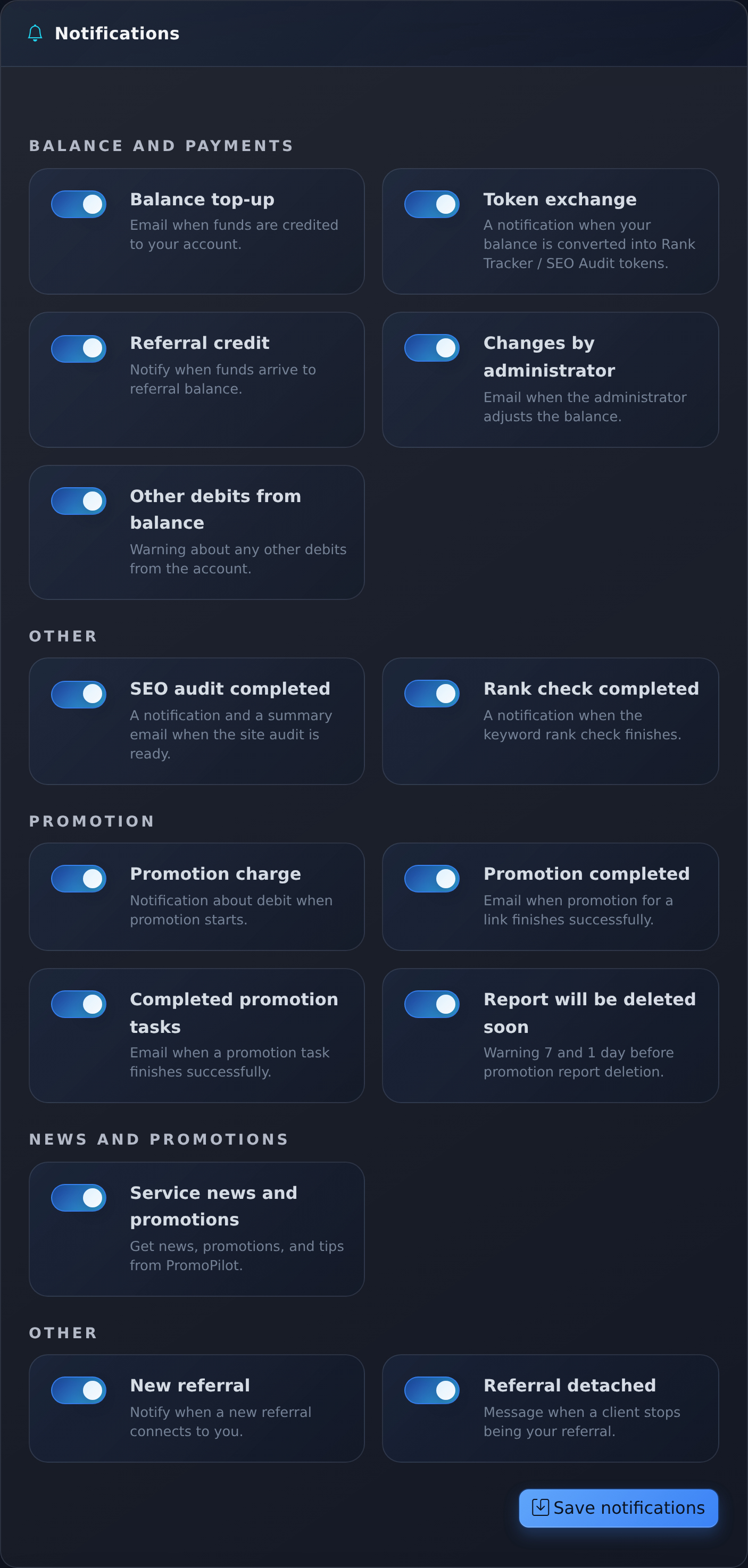
What Events Exist
| Group | Events |
|---|---|
| Balance and Payments | Balance replenishment, account documents (invoice and act), charges for promotion, other charges, token exchange |
| Promotion | Cascade completed, promotion tasks completed, report will soon be deleted |
| Services | SEO audit completed; keywords entered the top-10 Google for the first time as a result of automatic position check |
| Balance for Automatic Position Check | "Automatic position check stopped: insufficient balance" and "Balance sufficient for automatic position checks for approximately N days" (when less than 3 days remain) |
| Affiliate Program | New referral, referral credit, referral unlinked |
| News and Promotions | Announcements of features and replenishment promotions |
There is no longer a separate notification after each position check: with frequent automatic checks, it was noise. Instead, a message comes when keywords first enter the top-10, and once a week — a report email (more on this below). Balance warnings for automatic checks come to the dashboard and by email no more than once every 3 days; there is no separate switch for them — more details in the article Rank Tracker.
Channels
- In the Dashboard — bell icon in the header, feed of recent events.
- Email — requires a confirmed address.
- Telegram — requires linking, see account security.
- Push — mobile app, enabled on first launch.
Report Emails for Your Sites
In addition to event notifications, the platform sends emails with numbers for your own sites. All of them are sent only when there is something to show: if nothing has changed, there is no email.
| When It Arrives | |
|---|---|
| SEO-Radar | A series of three emails analyzing the site: the analysis itself, after 7 days — about autopilot, after 21 days — what has changed. The series repeats no more than once every 75 days. It does not arrive if autopilot is enabled or you have launched a plan from Radar in the last 21 days. More details — how Radar works. |
| Cascade Result | After 14, 30, and 60 days after a paid cascade — "was → became" for promoted pages. On the 30th and 60th days — only with real growth. |
| Results of Free Site Check | About a day after the free check in SEO Audit — 2–3 main findings. It does not arrive if you recently ordered a full audit or launched a cascade, as well as if there are fewer than two significant findings. |
| Monthly Site Monitoring | Once every ~30 days for active clients — free re-check of the site and an email "what has changed in a month". |
| Weekly Position Report | Only with automatic position check enabled in Rank Tracker and if positions have shifted in a week: top-10 was → became, who entered, grew, declined, who is at the threshold (positions 4–20). |
Two Consents in the Profile
In the profile settings, there are two switches for emails:
- "Reports about my sites" — Radar, positions, cascade results, and audit.
- "Promotions and news" — bonuses, discounts, new features.
Event notifications from the table above (charges, replenishments, cascade completion, etc.) do not depend on these consents: they are controlled by event switches. Service emails about your money, such as charges and receipts, come in any case.
How to Unsubscribe from Newsletters
- "Unsubscribe" link in the report email only disables reports. Promotions and news will continue to arrive according to profile settings.
- Link in the promotional email only disables promotions and news. Reports for your sites will continue to arrive.
- Complaint "This is spam", email return (address does not exist), or unsubscribe button from the email service stop all newsletters immediately: with such an unsubscribe, we do not know which email you unsubscribed from.
You can restore the newsletter in the profile: enable the necessary switch. Re-enabling "Promotions and news" removes the previous unsubscribe via the link in the email. Complaints of "spam" and email returns are not canceled by switches in the profile.
How Many Emails Can Arrive
To prevent emails from turning into a flood, limits apply to newsletters:
- No more than 6 newsletters in 30 days, with a minimum of 48 hours between any two;
- Important reports for your sites (Radar, cascade results, monthly monitoring, weekly position report, and other growth reports) may exceed this ceiling, but no more than 8 emails in 30 days; before the Radar email, the pause after the previous email is 72 hours;
- Emails about your bonuses and money in balance — with a 24-hour pause after the previous email.
If the limit has already been reached, the email does not go out immediately but waits until space is freed up. Event notifications and service emails do not count towards these limits.
One Setting per Event, Not per Channel
The switch in settings controls not the channel but the event. If you disable "Charge for Promotion", this event will stop going out both by email and in Telegram, and push notification simultaneously. It is not possible to separate it so that money comes only by email, and cascade completions only in Telegram.
The dashboard feed is not dependent on the switches: it remains a complete log of events, even if external channels are disabled.
What Each Channel Needs
| Channel | What Is Needed for Operation | What to Consider |
|---|---|---|
| Dashboard Feed | Nothing, always works | Bell icon with unread counter |
| Correct address in the profile | The address needs to be confirmed: this condition is also required for some bonuses | |
| Telegram | Bot connected by the platform and account linked | There is a general switch for Telegram notifications and a test message button |
| Push | Installed app and permission for notifications | Pressing the push opens the required screen: report, project, audit, or position check |
When Which Channel Is More Convenient
- One or two of your own projects. The feed and email are enough: events are rare, immediate response is not needed.
- Working with clients. Telegram: charges and cascade completions are visible immediately.
- Often away from the computer. Push is the fastest channel, the required screen opens with a tap.
- Do not want noise. Disable "Completed Promotion Tasks": during a large launch, this is the most frequent event.
If Notifications Do Not Arrive
- Check in settings if the event itself is enabled: a disabled switch turns off all external channels at once.
- Email: check the "Spam" folder and the address in the profile, confirm it if it is not yet confirmed.
- Report emails and promotions: check the consents "Reports about my sites" and "Promotions and news" in the profile — you may have previously unsubscribed via the link in the email. Also consider the limits: the email may arrive a day or two later.
- Telegram: ensure that the account is linked and the general switch is enabled, send yourself a test message.
- Push: check the permission in the phone's system settings. Logging back into the app re-registers the device.
- If the event is not in any channel and not in the feed, it probably just did not happen — check with the report.
Frequently Asked Questions
Can different events be directed to different channels? No. The setting works at the event level: an enabled event goes to all connected channels at once.
I unsubscribed from promotions — will reports for sites stop coming? No. The link in the promotional email only disables promotions; reports are managed by a separate consent "Reports about my sites".
Do notifications about affiliate credits come? Yes: new referral, credit, and unlinking a referral are separate events, see affiliate program.
Where to set up notifications from the phone? The same switches are available in the app, where Telegram is also linked — see mobile app.