Schema Markup on 4,874 Sites: What's Missing (2026)
We checked schema.org markup (JSON-LD and microdata) on 4,874 websites on November 15–16, 2026: the homepage of every site and about 10 internal pages on 4,545 of them. Two in three homepages (67.4%) carry some markup, but most of it is the generic layer that SEO plugins add by default: WebSite…
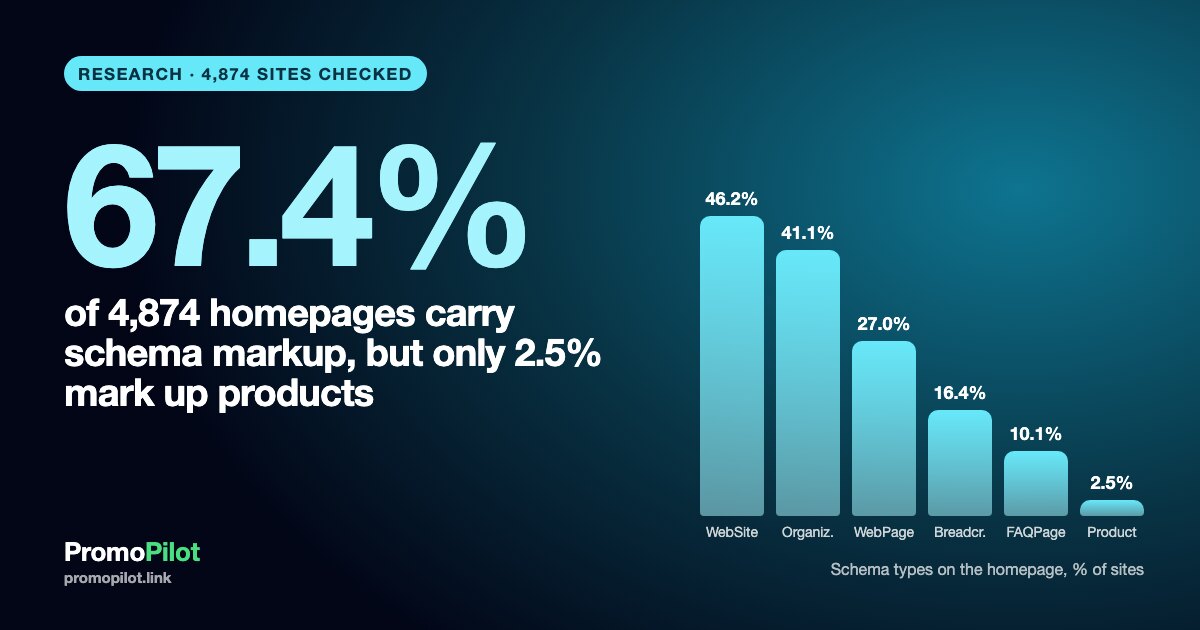
We checked schema.org markup (JSON-LD and microdata) on 4,874 websites on November 15–16, 2026: the homepage of every site and about 10 internal pages on 4,545 of them. Two in three homepages (67.4%) carry some markup, but most of it is the generic layer that SEO plugins add by default: WebSite, Organization, WebPage. The types that describe what a business actually sells or publishes are rare on the homepage: Product on 2.5%, LocalBusiness on 4.0%, Article on 5.6%. Meanwhile 18.4% of sites have no markup on any page we checked. Below are the numbers, which types each kind of site needs, ready JSON-LD examples, how to test markup and the mistakes we see most often. Caveat: the sample is non-random (sites from our search-results cache), so the figures describe this sample, not the whole web.
Data: PromoPilot crawl of 6,000 sites, November 15–16, 2026; 4,874 sites whose homepage returned 200 with HTML are in the calculation, 4,545 of them with sampled internal pages
Key numbers
- Homepage: 67.4% of 4,874 sites have schema.org markup on the homepage (3,284). 32.6% have none.
- Whole sample (4,545 sites, homepage plus about 10 internal pages): 68.1% have markup on both the homepage and internal pages, 2.9% only on the homepage, 10.7% only on internal pages (487), 18.4% nowhere (835).
- Most common types on the homepage: WebSite 46.2%, Organization 41.1%, WebPage 27.0%, BreadcrumbList 16.4%, FAQPage 10.1%. Business-specific types are rare: Article 5.6%, LocalBusiness 4.0%, ItemList 3.3%, Product 2.5%.
- Internal pages change the picture: Product appears on the homepage or a sampled page of 12.3% of sites (559), BreadcrumbList on 56.1%, the Article family (Article, BlogPosting, NewsArticle) on 22.1%.
- Platforms: 90.2% of WordPress homepages carry markup (425 of 471) against 62.7% of sites without a CMS generator tag (2,293 of 3,659) and 25.5% of Drupal sites (12 of 47).
- Broken JSON-LD is rare: 0.4% of homepages (20) have a JSON-LD block that does not parse; 1.3% of sites (59 of 4,545) have one on the homepage or a sampled page. The usual problem is missing markup, not broken markup.
- Markup goes with other metadata: 77.4% of homepages with Open Graph tags carry schema against 29.1% of those without; with hreflang 79.5% against 61.2% without.
What schema markup does and what it does not do
Schema markup is a machine-readable description of a page: "this is a product, it costs $49, it is in stock", "this is a dental clinic at this address, open 9 to 6", "this article was published on this date by this author". Search engines read it to understand the page and, for some types, to show a rich result: price and availability under a product, review stars, breadcrumbs instead of a raw URL, a site name and logo. Google's documentation recommends JSON-LD, a <script type="application/ld+json"> block, over microdata and RDFa because it is easier to add and maintain (Google, Introduction to structured data).
Two limits matter. First, markup gives a page the right to a rich result, but Google does not promise to show one: it decides per query and per page. Second, markup is not a ranking lever. Google uses it to understand content and to build search features; it does not move a page up for having it. If a rich result appears, the gain is in how the snippet looks and how often people click it, not in position. The list of supported features also changes: since August 2023 Google shows FAQ rich results only for well-known, authoritative government and health websites, and HowTo rich results are no longer shown (Google Search Central blog). The sitelinks search box that WebSite with SearchAction used to trigger was retired in November 2024.

What sites mark up
On the homepage the three generic types dominate: WebSite (46.2%), Organization (41.1%) and WebPage (27.0%). 30.7% of homepages have WebSite and Organization together, which is the default output of the popular WordPress SEO plugins. This layer is useful (Google uses WebSite for the site name in results and Organization for the logo and company details), but it says nothing about what the site offers. The specific types come far behind: BreadcrumbList 16.4%, ImageObject 11.5%, FAQPage 10.1%, Article 5.6%, Person 5.5%, LocalBusiness 4.0%, ItemList 3.3%, Product 2.5%, SoftwareApplication 2.0%.
Homepages also differ in how much they describe. 14.6% carry one type, 14.7% two, 12.0% three and 26.1% four or more. A homepage with one generic type is technically "marked up" but gives a search engine little to work with.

The homepage is not where the specific markup lives
Product, article and list markup belongs on the pages that hold products, articles and lists, so a homepage-only check undercounts it. When we add about 10 sampled internal pages per site, Product rises from 2.6% to 12.3% of sites (base: 4,545 sites with sampled pages; 559 of them), ItemList from 3.5% to 13.2%, CollectionPage from 2.3% to 18.3%, Article from 5.9% to 16.5% and BreadcrumbList from 17.5% to 56.1%. LocalBusiness barely moves (4.2% to 5.6%): it describes the business itself, and sites that have it put it on the homepage.
The reverse case matters too. 487 sites (10.7%) have no markup on the homepage but have it on internal pages: typically breadcrumbs and article markup from a theme, with nothing describing the organization. And on sites where internal pages are marked up, markup is a template decision: 67.5% of them (2,420 of 3,583) mark up every sampled internal page, and the median share is 100%. Markup is either in the template or it is not, so one fix in the template covers the whole section.
FAQPage is the type that most clearly lags behind Google's rules. It is on 10.1% of homepages and on the homepage or a sampled page of 25.7% of sites, although FAQ rich results are now limited to authoritative government and health sites. FAQ markup is not harmful, but for a shop or an agency it no longer produces the accordion under the snippet that many still expect from it. HowTo, whose rich results Google has removed, is still on 1.8% of sites.

Platforms and other metadata
Markup is mostly added by software, not by hand. 90.2% of homepages with a WordPress generator tag carry markup (425 of 471), and 82.5% of sites whose generator tag names a plugin or another system. Among sites without a generator tag (3,659, three quarters of the sample, every kind of platform and custom code) the share is 62.7%. Drupal stands out at the other end: 25.5% (12 of 47), because markup there needs a separate module. The groups other than WordPress and "no tag" are small, so read them as a direction, not a measurement.

Sites that look after one kind of metadata tend to look after the others. Among homepages with Open Graph tags 77.4% carry schema, against 29.1% of homepages without them. Among homepages with hreflang tags 79.5% carry schema, against 61.2% without. This is a correlation, not a cause: both go with sites that use an SEO plugin or have someone who maintains the technical side.
| Group | Homepages | With schema | Share |
|---|---|---|---|
| Open Graph tags present | 3,867 | 2,991 | 77.4% |
| No Open Graph tags | 1,007 | 293 | 29.1% |
| hreflang tags present | 1,647 | 1,310 | 79.5% |
| No hreflang tags | 3,227 | 1,974 | 61.2% |
| All homepages | 4,874 | 3,284 | 67.4% |
You can check the Open Graph tags of a page with the Open Graph debugger, its hreflang set with the hreflang validator and its platform with the CMS detector.
Which types each kind of site needs
Start from what the site is, not from the list of all schema.org types. Every site benefits from Organization (or a more specific subtype) and WebSite on the homepage and BreadcrumbList on inner pages. Beyond that:
| Site | Where | Types | What it can give in Google |
|---|---|---|---|
| Online shop | Product pages | Product with offers (price, priceCurrency, availability), aggregateRating and review if you have real reviews | Price, availability, rating under the result; product listings |
| Online shop | Category pages | BreadcrumbList; ItemList or CollectionPage optional | Breadcrumb path on desktop |
| Local business | Homepage, contact page | LocalBusiness or a subtype (Dentist, Restaurant, AutoRepair, LegalService...) with address, telephone, openingHoursSpecification, geo | Business details for Google; the business profile itself is managed in Google Business Profile |
| Blog, media, content site | Article pages | Article, BlogPosting or NewsArticle with headline, image, datePublished, dateModified, author (Person with name and url) | Clearer title, date, image and author for Google; no special rich result is promised |
| SaaS, app | Product or pricing page | SoftwareApplication (or WebApplication) with offers, applicationCategory, operatingSystem; aggregateRating only from real reviews | Software app rich result with rating and price |
| Any site | Homepage | Organization with name, url, logo, sameAs; WebSite with name | Site name and logo in results |
In our sample the gap is clearest for shops and local businesses: Product is on 12.3% of sites even when internal pages are counted, LocalBusiness on 5.6%, while WebSite is on 51.3% and Organization on 46.8%. The generic layer is there on most sites; the layer that describes the offer is often missing.
Ready JSON-LD examples
Replace the example values with your real data. Every value in markup must match what a visitor sees on the page. You can also build these blocks in the schema generator.
Organization and WebSite (homepage, any site)
<script type="application/ld+json">
{
  "@context": "https://schema.org",
  "@graph": [
    {
      "@type": "Organization",
      "@id": "https://example.com/#organization",
      "name": "Example Studio",
      "url": "https://example.com/",
      "logo": "https://example.com/logo.png",
      "sameAs": ["https://www.linkedin.com/company/example-studio"]
    },
    {
      "@type": "WebSite",
      "@id": "https://example.com/#website",
      "name": "Example Studio",
      "url": "https://example.com/",
      "publisher": {"@id": "https://example.com/#organization"}
    }
  ]
}
</script>
Product (product page of a shop)
<script type="application/ld+json">
{
  "@context": "https://schema.org",
  "@type": "Product",
  "name": "Leather Notebook A5",
  "image": "https://example.com/img/notebook-a5.jpg",
  "description": "A5 notebook with a leather cover, 192 dotted pages.",
  "sku": "NB-A5-01",
  "brand": {"@type": "Brand", "name": "Example"},
  "offers": {
    "@type": "Offer",
    "url": "https://example.com/notebook-a5",
    "price": "49.00",
    "priceCurrency": "USD",
    "availability": "https://schema.org/InStock"
  },
  "aggregateRating": {"@type": "AggregateRating", "ratingValue": "4.7", "reviewCount": "38"}
}
</script>
Remove aggregateRating if the page does not show these reviews. Ratings that are not visible on the page, or that the business wrote about itself, break Google's rules for review snippets.
LocalBusiness (homepage or contact page)
<script type="application/ld+json">
{
  "@context": "https://schema.org",
  "@type": "Dentist",
  "name": "Example Dental Clinic",
  "url": "https://example.com/",
  "image": "https://example.com/img/clinic.jpg",
  "telephone": "+1-555-010-0199",
  "address": {
    "@type": "PostalAddress",
    "streetAddress": "12 Main Street",
    "addressLocality": "Springfield",
    "postalCode": "62701",
    "addressCountry": "US"
  },
  "geo": {"@type": "GeoCoordinates", "latitude": 39.7990, "longitude": -89.6440},
  "openingHoursSpecification": [{
    "@type": "OpeningHoursSpecification",
    "dayOfWeek": ["Monday","Tuesday","Wednesday","Thursday","Friday"],
    "opens": "09:00", "closes": "18:00"
  }]
}
</script>
BlogPosting (article page)
<script type="application/ld+json">
{
  "@context": "https://schema.org",
  "@type": "BlogPosting",
  "headline": "How to choose a notebook for daily planning",
  "image": ["https://example.com/img/planning-1200.jpg"],
  "datePublished": "2026-11-10T08:00:00+00:00",
  "dateModified": "2026-11-18T09:30:00+00:00",
  "author": {"@type": "Person", "name": "Jane Doe", "url": "https://example.com/authors/jane-doe"},
  "publisher": {"@id": "https://example.com/#organization"}
}
</script>
BreadcrumbList (any inner page)
<script type="application/ld+json">
{
  "@context": "https://schema.org",
  "@type": "BreadcrumbList",
  "itemListElement": [
    {"@type": "ListItem", "position": 1, "name": "Shop", "item": "https://example.com/shop/"},
    {"@type": "ListItem", "position": 2, "name": "Notebooks", "item": "https://example.com/shop/notebooks/"},
    {"@type": "ListItem", "position": 3, "name": "Leather Notebook A5"}
  ]
}
</script>
SoftwareApplication (SaaS or app page)
<script type="application/ld+json">
{
  "@context": "https://schema.org",
  "@type": "SoftwareApplication",
  "name": "Example Planner",
  "applicationCategory": "BusinessApplication",
  "operatingSystem": "Web, iOS, Android",
  "offers": {"@type": "Offer", "price": "12.00", "priceCurrency": "USD"},
  "aggregateRating": {"@type": "AggregateRating", "ratingValue": "4.6", "ratingCount": "212"}
}
</script>
For the software app rich result Google requires a rating or review together with the price. If you have no real ratings, keep the block without aggregateRating: it still describes the product, it just will not qualify for that result.
How to check your markup
Use three checks, in this order:
- Rich Results Test (search.google.com/test/rich-results). Paste a URL or a code snippet. It shows which Google rich results the page is eligible for, with errors (the result cannot appear) and warnings (optional fields missing). It only knows the types Google supports, so a valid but unsupported type simply does not appear in the report.
- Schema Markup Validator (validator.schema.org). Checks any schema.org markup against the vocabulary, including types Google does not use. Use it to see the whole graph and to catch typos in type and property names.
- Search Console reports. Under "Enhancements" and, for products, "Shopping" (in the sidebar, only for types Google found on your site), you see the reports for Breadcrumbs, Product snippets, Merchant listings, Review snippets, Videos and others, with valid and invalid items and examples of affected URLs. After a fix, use "Validate fix" in the report and URL Inspection for a single page. These reports are based on the pages Google crawled, so they show problems on the whole site, not only on the pages you tested.
For a quick look at several pages at once, our schema checker lists the types found on a page and flags broken JSON-LD, and the site audit flags broken and incomplete markup across the crawled pages. Neither replaces the Rich Results Test for the final word on Google features.
Common mistakes
- Only the plugin layer. WebSite and Organization from an SEO plugin, but no Product on product pages or LocalBusiness for a local business. In our sample this is the most common pattern.
- Markup that does not match the page. A price, rating or opening hours in JSON-LD that differ from what visitors see. Google treats this as a spam signal and can issue a manual action for structured data.
- Self-serving reviews. aggregateRating for your own business on your own homepage (LocalBusiness or Organization) does not qualify for review stars in Google.
- Required fields missing. Product without offers, review or aggregateRating; Offer without price or priceCurrency; LocalBusiness without address. The markup parses, but the rich result cannot appear.
- Broken JSON. A trailing comma, unescaped quotes or line breaks inside a text value, an HTML comment inside the block. A block that does not parse is ignored entirely. Rare in our sample (0.4% of homepages), but it takes out every type in that block.
- Two conflicting sources. A theme and a plugin both output Organization or Product with different values. Keep one source and disable the other.
- Expecting retired features. FAQPage for the accordion under the snippet (now only for authoritative government and health sites), HowTo (no longer shown), SearchAction for the sitelinks search box (retired). The markup is harmless, but it will not bring these features back.
- Markup on the homepage only. Product, Article and BreadcrumbList belong on the pages they describe. Checking only the homepage misses them, and adding them only to the homepage is wrong.
Methodology and limitations
Data comes from the PromoPilot website crawl (TRI) of 6,000 sites from our search-results cache, collected November 15–16, 2026. We kept sites with a successful crawl whose homepage returned 200 with HTML: 4,874. For 4,545 of them we also sampled up to 10 internal pages linked from the homepage. Our crawler reads schema.org types from JSON-LD blocks (top-level @type and the types in @graph) and from microdata itemtype attributes, up to 8 distinct types per page; 3.4% of homepages reach this cap, so some extra types on them are not counted. Types nested inside other objects (an Offer inside a Product, a Question inside FAQPage) are not counted, so Offer and AggregateRating are undercounted by design. ListItem alone is not counted as markup. Subtypes are counted under their own names (Dentist is not added to LocalBusiness). The broken-markup figure counts JSON-LD blocks that fail JSON parsing; it does not check Google's requirements for rich results, so markup that parses but misses required fields is not in it. The CMS comes from the generator meta tag, which many sites hide.
Limitations: the sample is not random and cannot be transferred to the whole web; sites that block crawlers are excluded; we did not test whether Google actually shows rich results for these sites, and we did not measure any effect on rankings or traffic; correlations (Open Graph, hreflang, CMS) are not causes. The data contains no client projects and no domains. The aggregates are published as CSV under CC BY 4.0.
FAQ
Does schema markup improve rankings?
No. Google uses structured data to understand a page and to show rich results, not as a ranking boost. Markup makes a page eligible for a rich result such as price, availability or breadcrumbs, but Google does not promise to show it. Any gain comes from how the result looks and how often people click it.
Should I use JSON-LD or microdata?
JSON-LD, unless your platform already outputs correct microdata. Google recommends JSON-LD because it sits in one script block, separate from the HTML, and is easier to maintain. Do not output the same entity twice with different values in both formats.
Which schema types does my site need?
Every site: Organization and WebSite on the homepage, BreadcrumbList on inner pages. A shop adds Product with offers on product pages. A local business adds LocalBusiness or a subtype with address and opening hours. A blog or media site adds Article, BlogPosting or NewsArticle. A SaaS adds SoftwareApplication. In our sample of 4,874 sites, Product is on only 2.5% of homepages and LocalBusiness on 4.0%.
Is FAQPage markup still worth adding?
Only with low expectations. Since August 2023 Google shows FAQ rich results only for well-known, authoritative government and health websites. FAQ markup does no harm and still describes the page, but for most sites it no longer produces the accordion under the snippet. In our sample 10.1% of homepages still carry FAQPage.
How do I test schema markup?
Use the Rich Results Test (search.google.com/test/rich-results) to see which Google rich results a page is eligible for, the Schema Markup Validator (validator.schema.org) to check the markup against the schema.org vocabulary, and the Enhancements reports in Search Console to find errors across the whole site.
Why does the Rich Results Test show nothing although I added markup?
The test only reports types that Google supports for rich results. Organization, WebPage or Person may be valid and still not appear as a rich result. Check the same URL in the Schema Markup Validator: if the markup shows up there, it is read correctly. If it does not show up anywhere, the block may not parse or may be added by JavaScript that failed to run.
Sources
- Google Search Central, Introduction to structured data markup: developers.google.com
- Google Search Central, General structured data guidelines: developers.google.com
- Google Search Central blog, Changes to HowTo and FAQ rich results (August 2023): developers.google.com
- Google Search Central, Search gallery of supported structured data: developers.google.com
- Rich Results Test: search.google.com; Schema Markup Validator: validator.schema.org
How to cite
PromoPilot (2026). Schema markup on 4,874 sites: what is marked up and what is missing. Data November 15–16, 2026. CC BY 4.0: https://promopilot.link/uploads/blog/research/schema-markup-2311/schema-markup-4874-sites-2026-11.csv . Article: https://promopilot.link/en/blog/schema-markup-4874-sites-what-is-missing-2026
Download the data
The aggregate tables (CSV, license CC BY 4.0). They contain aggregates only, no projects, domains or client data.
- Key metrics (markup on homepage and internal pages, broken JSON-LD, Open Graph and hreflang slices): https://promopilot.link/uploads/blog/research/schema-markup-2311/schema-markup-4874-sites-2026-11.csv
- Schema types on the homepage and anywhere in the sample: https://promopilot.link/uploads/blog/research/schema-markup-2311/schema-types-home-vs-internal-2026-11.csv
- Markup by CMS (generator tag): https://promopilot.link/uploads/blog/research/schema-markup-2311/schema-by-cms-2026-11.csv