
Free XML Sitemap Generator
Free XML sitemap generator: enter your site's address and we follow its internal links (up to 30 pages, 100 when signed in) to build a ready sitemap.xml. It respects robots.txt, skips noindex pages and non-canonical URLs, adds lastmod only when the page reports a real date, and can include hreflang alternates. Download it as sitemap.xml or sitemap.xml.gz. Pages are read as raw HTML; JavaScript is not executed.
Key facts
An online sitemap.xml generator: enter a site address and we crawl its internal links (up to 30 pages, 100 after sign-in), respect robots.txt, noindex and canonical, and build a ready XML with real lastmod dates. Free. For sites above a hundred pages you need a generator without this cap or a CMS plugin.
- Price
- Free
- Sign-up
- Not required
- Processing
- On our server: we crawl the site's internal links (HTML, no JavaScript) one by one with a 100 ms pause between requests and assemble the XML
- Input
- The site address (start page) and a switch to “include hreflang alternates”
- Limits
- Up to 30 pages for a guest and 100 after sign-in; 5 runs per minute and a daily limit (10 for a guest, 30 when logged in, unlimited for Pro); a crawl of up to 50 seconds; one host only; JavaScript is not executed
- Output
- A ready sitemap.xml to download or copy: final URLs, a real lastmod (if the site provides it), optionally hreflang via xhtml:link; a list of excluded pages with the reason (status, noindex, canonical)
- Last updated
Video walkthrough 1:02

Free XML Sitemap Generator: Create sitemap.xml & See Which Pages Are Skipped
Generate an XML sitemap for free: the tool crawls your internal links, keeps the indexable pages, adds hreflang alternates and explains every page it skipped.
Chapters
Video transcript
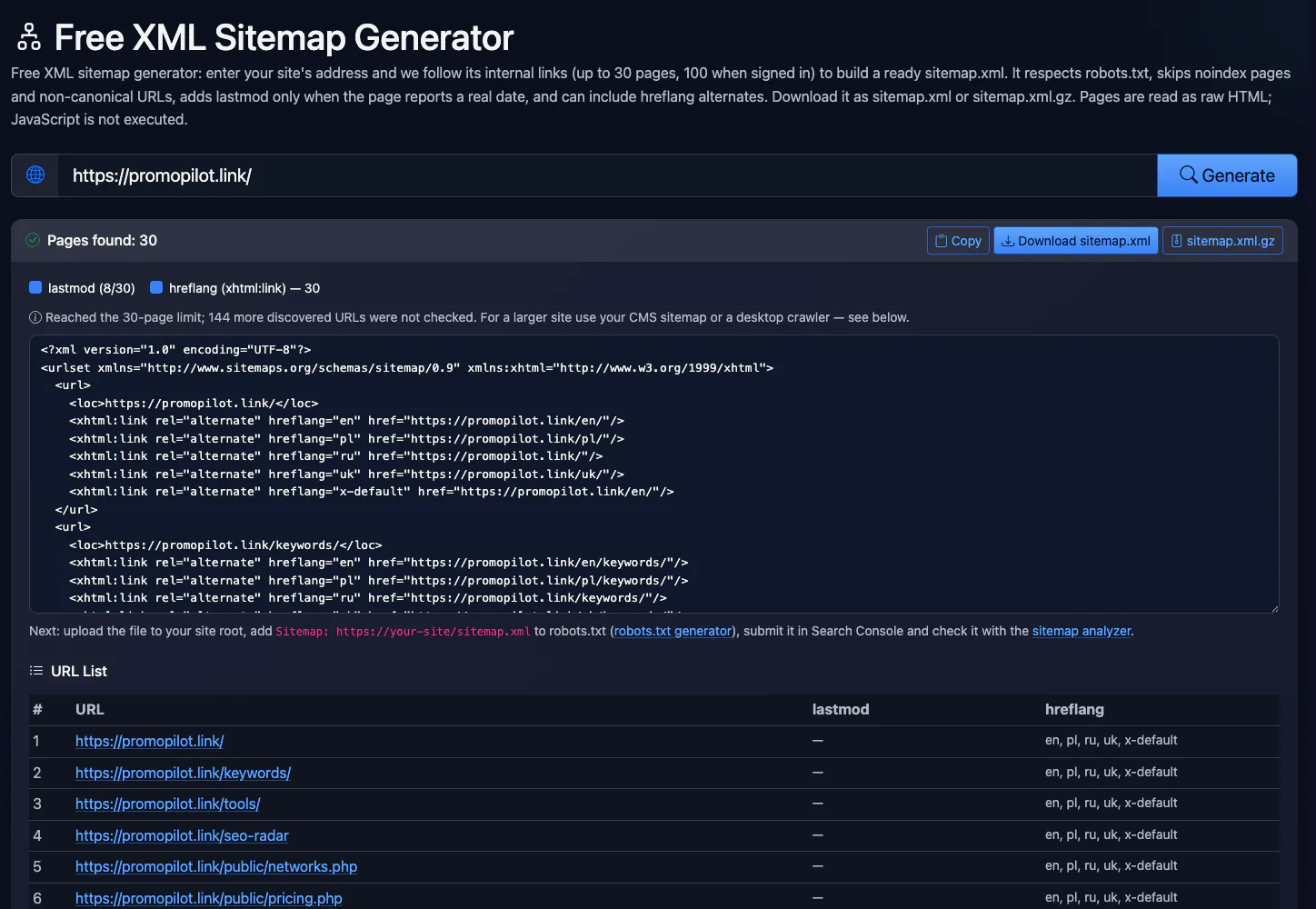
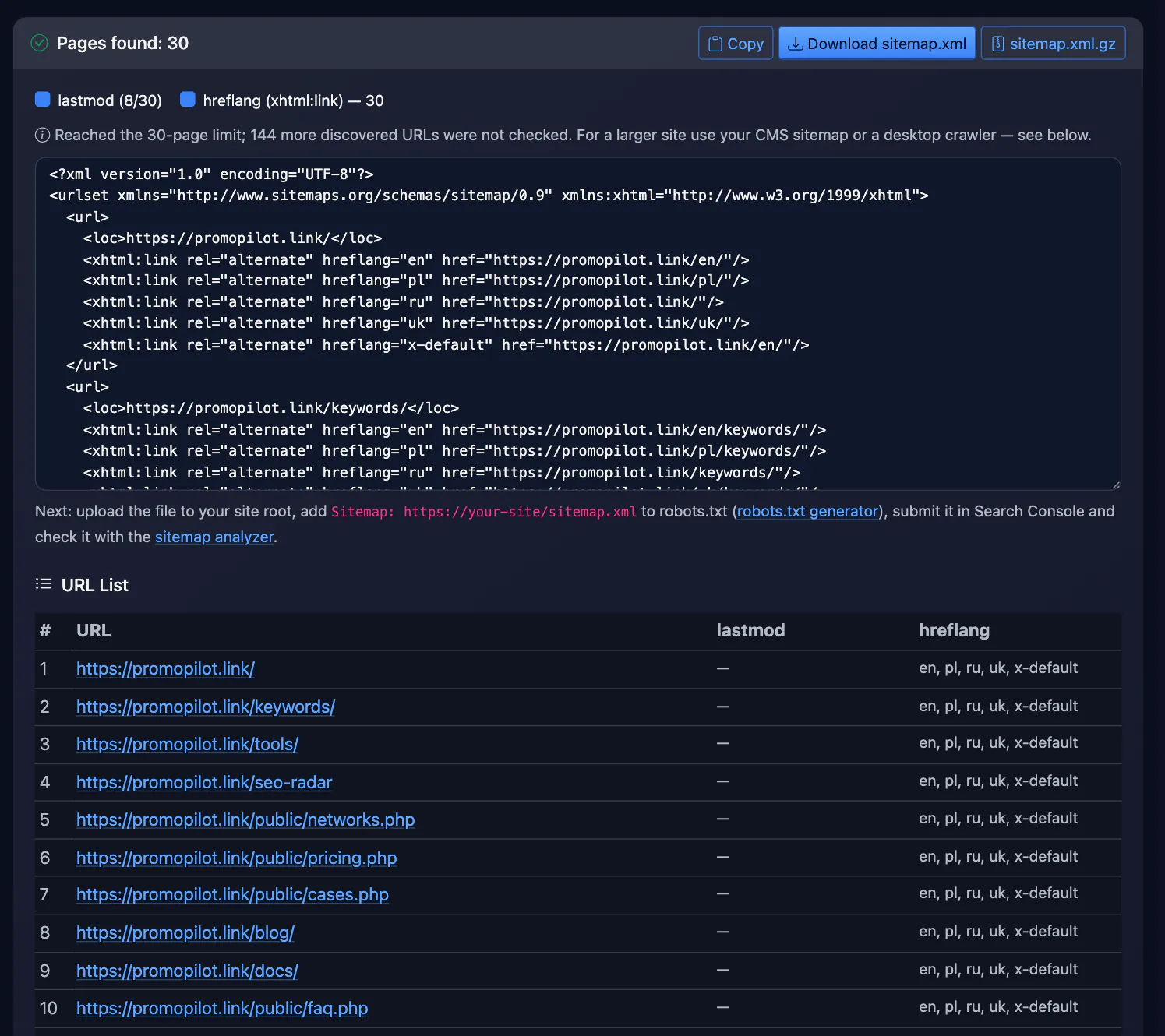
Need an XML sitemap for your site? Here's a free generator that crawls your pages and tells you what it left out. Enter your site address. I'm using our own. Click Generate. It follows internal links and found thirty pages, which is the limit without an account. A hundred and forty-four more were discovered but not checked. Here is the sitemap XML, ready to copy or download, plain or gzipped. Dates appear only where a page reports one, eight of thirty here. And hreflang alternates are included. Pages that don't belong in a sitemap are listed with the reason. For example, pages blocked by robots.txt. Thirty pages as a guest, a hundred when signed in. Links that only appear after JavaScript runs are not discovered. And no fake dates. Free, no sign-up. The link is in the description. Subscribe for more free tools.
See it in action
Free XML sitemap generator
This sitemap generator crawls your site from the home page through its internal links and builds an XML sitemap for Google, Bing and other search engines. Only pages that return 200 on the same host make it in: nothing blocked by robots.txt, nothing with noindex, and no URLs whose canonical points elsewhere. lastmod comes from the page itself or its Last-Modified header rather than being stamped with today's date.
How to Use
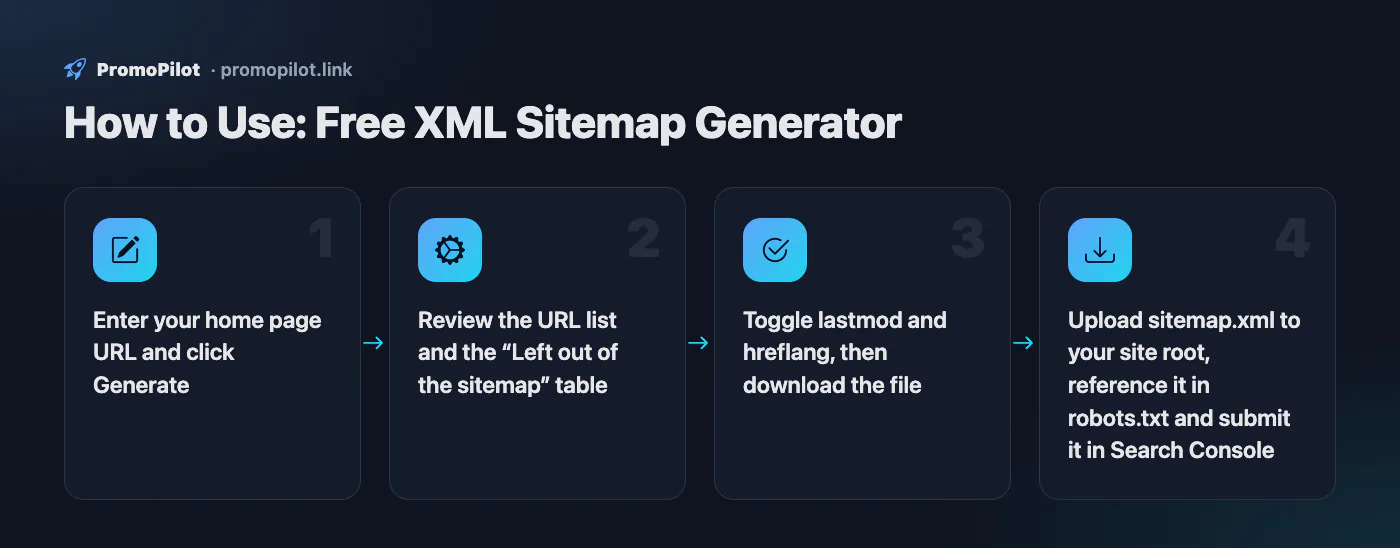
- Enter your home page URL and click Generate
- Review the URL list and the “Left out of the sitemap” table
- Toggle lastmod and hreflang, then download the file
- Upload sitemap.xml to your site root, reference it in robots.txt and submit it in Search Console
FAQ
Who it is for and typical uses
- Small sites and landing pages. No sitemap plugin: generate sitemap.xml, download the file and upload it to the site root.
- First submission to Search Console. A ready map and a
Sitemap:line in robots.txt help Google get to know a new site. - Structure check. The list of excluded pages shows where there is noindex, errors, redirects and pages whose canonical points elsewhere.
- Multilingual sites. A switch adds hreflang alternates from page tags in
xhtml:linkformat.
Honest limitations
- Page cap. A guest gets up to 30 pages and a signed-in user up to 100; the crawl is limited to 50 seconds. Large sites will not fit into the map.
- Only what links reveal. Pages without internal links (“orphans”) and links created by JavaScript do not reach the map.
- One host. Subdomains and a site on another domain are crawled separately; links to them are not included.
- No priority or changefreq, no image, video or news sitemaps and no sitemap index file. Google ignores priority and changefreq anyway.
- lastmod appears only when a real date exists (Last-Modified header, article metadata, JSON-LD). If the site gives no dates, there is no tag.
- You place the file yourself. There is no automatic refresh: generate the map again after changing the site.
Related: sitemap analyzer, robots.txt checker, robots.txt generator, hreflang validator, site indexing checker.
PromoPilot vs alternatives: comparison
We compare only what is confirmed on each service's own pages. Where we could not confirm a fact, the cell shows "—".
| Parameter | PromoPilot | XML-Sitemaps.com | Screaming Frog SEO Spider |
|---|---|---|---|
| Free limit | 30 pages for a guest, 100 after sign-in | Up to 500 pages per sitemap | Up to 500 URLs free |
| Registration | Optional (sign-in for 100 pages) | Not required | — |
| Excludes noindex and cross-canonical pages | ✓ | — | ✓ by default excludes redirects, errors, noindex, canonicalised and robots.txt-blocked pages |
| Image / video / news sitemaps | ✗ | In paid PRO: image, video and news sitemaps | ✓ image sitemaps and sitemap indexes |
| Automatic sitemap updates | ✗ | ✓ in PRO | — |
| Paid plan price | No paid plan for this tool | PRO Sitemaps from $2.44 per month | $279 per licence, per year |
Scroll the table sideways
Where we are weaker: the 30 and 100 page limits, no image, video or news sitemaps, no index file or automatic updates; JavaScript is not executed, so links created by scripts are not found.
When to choose PromoPilot: When you need a quick map of a small site (a business card site, a landing page, a blog up to a hundred pages) with no installation and proper cleaning: no noindex, redirects or canonical duplicates. For large sites and automatic updates use a CMS plugin or a crawler.
Checked on: . "—" means not confirmed on the official page; terms and prices change, so check the services' own sites.
How to create a sitemap.xml in five minutes
- Generate the sitemap. Enter your home page URL above. The generator loads it, collects the internal links and keeps following them until it has 30 pages (100 when signed in) or 50 seconds have passed.
- Check what made it in. Under the XML you get the URL list and a “Left out of the sitemap” table with the reason for each page. If an important page is in that table, fix the cause on your site (a stray noindex, for example) and run the generator again.
- Download the file as plain
sitemap.xmlor compressedsitemap.xml.gz— search engines accept both. - Upload it to your site root so it opens at
https://example.com/sitemap.xml. A sitemap only covers URLs in its own folder and below, so the root is the safe choice. - Tell search engines. Add
Sitemap: https://example.com/sitemap.xmlto robots.txt (the robots.txt generator writes that line for you) and submit the sitemap in Google Search Console (Sitemaps) and Bing Webmaster Tools. - Verify the result with the sitemap analyzer: URL count, XML validity and lastmod coverage.
What the generator handles for you
| Common sitemap problem | What the generator does |
|---|---|
| Redirecting URLs in the sitemap | Writes the final URL after every redirect. If a redirect leads to another host, the page is excluded. |
| URLs blocked by robots.txt | Reads your robots.txt and never requests blocked URLs, using the Googlebot group if there is one and the * group otherwise. |
| “Submitted URL marked noindex” | Checks meta robots and the X-Robots-Tag header; noindex pages stay out of the sitemap, though their links are still followed. |
| Non-canonical duplicates | If rel="canonical" points elsewhere, the canonical URL goes into the sitemap (once it has been checked) instead of the current page. |
| lastmod = today on every URL | Adds a date only when the page itself provides one: article:modified_time, og:updated_time, dateModified in JSON-LD, or a Last-Modified header that isn't just the current time. No date, no tag. |
| UTM tags and junk parameters | Strips utm_*, gclid, fbclid and similar parameters, and skips ?replytocom= and ?add-to-cart= links, images, PDFs, archives and other files. |
Multilingual sites: hreflang in the sitemap
If your pages carry <link rel="alternate" hreflang="…" href="…"> tags, the generator copies them into the sitemap as xhtml:link entries, so Google gets every language pairing from one file. Google accepts hreflang in the HTML, in HTTP headers or in the sitemap, and one method is enough — you can switch the option off. Remember that each language version must reference all the others and itself; the hreflang validator checks that.
Limits — and when to use something else
- Up to 100 pages. That covers small sites, landing pages and custom-built projects. A store or blog with hundreds of pages should use its CMS: WordPress has served
/wp-sitemap.xmlout of the box since version 5.5, and Yoast SEO and Rank Math generate/sitemap_index.xmland update it every time you publish. - Links in the HTML only. JavaScript is not executed, so pages linked only from a script-rendered menu or catalog won't be found — a good hint to check whether Googlebot finds them.
- A snapshot in time. When you add pages, regenerate the sitemap or switch to a CMS sitemap that updates itself.
- Orphan pages can't be discovered. A crawl can't reach pages with no internal links pointing at them. Add those to the sitemap by hand and link to them — a sitemap is no substitute for internal linking.
Sample output
<?xml version="1.0" encoding="UTF-8"?>
<urlset xmlns="http://www.sitemaps.org/schemas/sitemap/0.9" xmlns:xhtml="http://www.w3.org/1999/xhtml">
  <url>
    <loc>https://example.com/blog/post/</loc>
    <lastmod>2026-10-01</lastmod>
    <xhtml:link rel="alternate" hreflang="en" href="https://example.com/blog/post/"/>
    <xhtml:link rel="alternate" hreflang="de" href="https://example.com/de/blog/post/"/>
  </url>
</urlset>
There are no priority or changefreq tags on purpose: Google ignores them. Once the sitemap is live, watch the Pages report in Search Console to see which submitted URLs get indexed. If pages stay unindexed, run them through the index checker and check your internal links with the broken link checker.
Improve search rankings
SEO problems may be costing you traffic. Cascade link building will improve site visibility in search.